In today’s interconnected world, JSON (JavaScript Object Notation) has become the de-facto standard for data interchange between web services and applications. If you’re a Java developer, the Jackson JSON parser is undoubtedly one of the most powerful and widely used library options for handling json content efficiently. This guide will walk you through everything you need to know to effectively parse, generate, and manipulate jackson json data.
Why Choose the Jackson JSON Parser?
The Jackson json parser stands out because it offers high-performance streaming and versatile data-binding modules. When creating modern java applications, you need a jsonparser that is fast, extensible, and mature.
Jackson Core and Jackson Databind Modules
Jackson is split into several modules to keep it lightweight. The jackson core provides the low-level streaming jsonparser and jsongenerator, while jackson databind provides the high-level jackson objectmapper for effortless data conversion.
Setting Up the Jackson Library
To start using the jackson json library, add the following dependencies to your project. By adding jackson-databind, you automatically enable access to the core json parser and annotation modules.
Maven Dependency
XML
<dependency>
    <groupId>com.fasterxml.jackson.core</groupId>
    <artifactId>jackson-databind</artifactId>
    <version>2.15.2</version>
</dependency>
Gradle Dependency
Bash
implementation 'com.fasterxml.jackson.core:jackson-databind:2.15.2'
JSON Parse and Data Binding with ObjectMapper
The core class in the library for data binding is the jackson objectmapper. It allows you to convert a json string into a Java class or type and vice versa.
1. Convert JSON to Java Object (Deserialization)
To parse json into a POJO, you simply use the readValue method on the mapper.
Java
ObjectMapper mapper = new ObjectMapper();
String jsonString = "{ \"name\":\"Jane Doe\", \"age\":25, \"isStudent\":true }";

// Parse json string into User class
User user = mapper.readValue(jsonString, User.class);
2. Java Object to JSON (Serialization)
To convert a java object back into a json string, use the jackson objectmapper writeValueAsString method. You can also enable “Pretty Print” to make the json content more readable.
Java
// Serialize Java object to JSON
String jsonOutput = mapper.writerWithDefaultPrettyPrinter().writeValueAsString(newUser);
Advanced JSON Parsing with JsonParser (Streaming API)
For extremely large json files, a java developer might prefer the streaming approach. This involves using the jsonfactory to create a jsonparser jackson instance. This jsonparser parser is the fastest way to parse data as it processes one token at a time.
Using JsonParser NextToken
The jsonparser allows you to iterate through the json content manually.
Java
JsonFactory factory = new JsonFactory();
// Creating a jsonparser from a string
JsonParser jsonParser = factory.createParser(jsonString);

while (jsonParser.nextToken() != JsonToken.END_OBJECT) {
    String fieldName = jsonParser.getCurrentName();
    if ("name".equals(fieldName)) {
        jsonParser.nextToken(); // Move to the value token
        System.out.println(jsonParser.getText());
    }
}
Handling Lists and Arrays
The jackson objectmapper handles collections by using a TypeReference. This ensures the mapper knows exactly which type of object to convert each element into within the array.
Java
List<User> users = mapper.readValue(jsonArrayString, new TypeReference<List<User>>() {});
Best Practices and JSONParser Feature Configuration
To handle real-world data, you often need to enable specific jsonparser feature settings. For example, if your json content contains comments, you must explicitly enable that feature on the mapper or jsonfactory:
- Comments:
mapper.enable(JsonParser.Feature.ALLOW_COMMENTS); - Unknown Fields: Use
@JsonIgnoreProperties(ignoreUnknown = true)to prevent errors when the json has extra fields.
Conclusion
The jackson json parser is an indispensable json parser for the modern java developer. Whether you are using the high-level objectmapper for simplicity or the low-level jsonparser for streaming performance, this library handles all your json parse needs. By understanding the core modules like jackson databind and utilizing the jsonfactory, you can build robust, high-performance java applications.
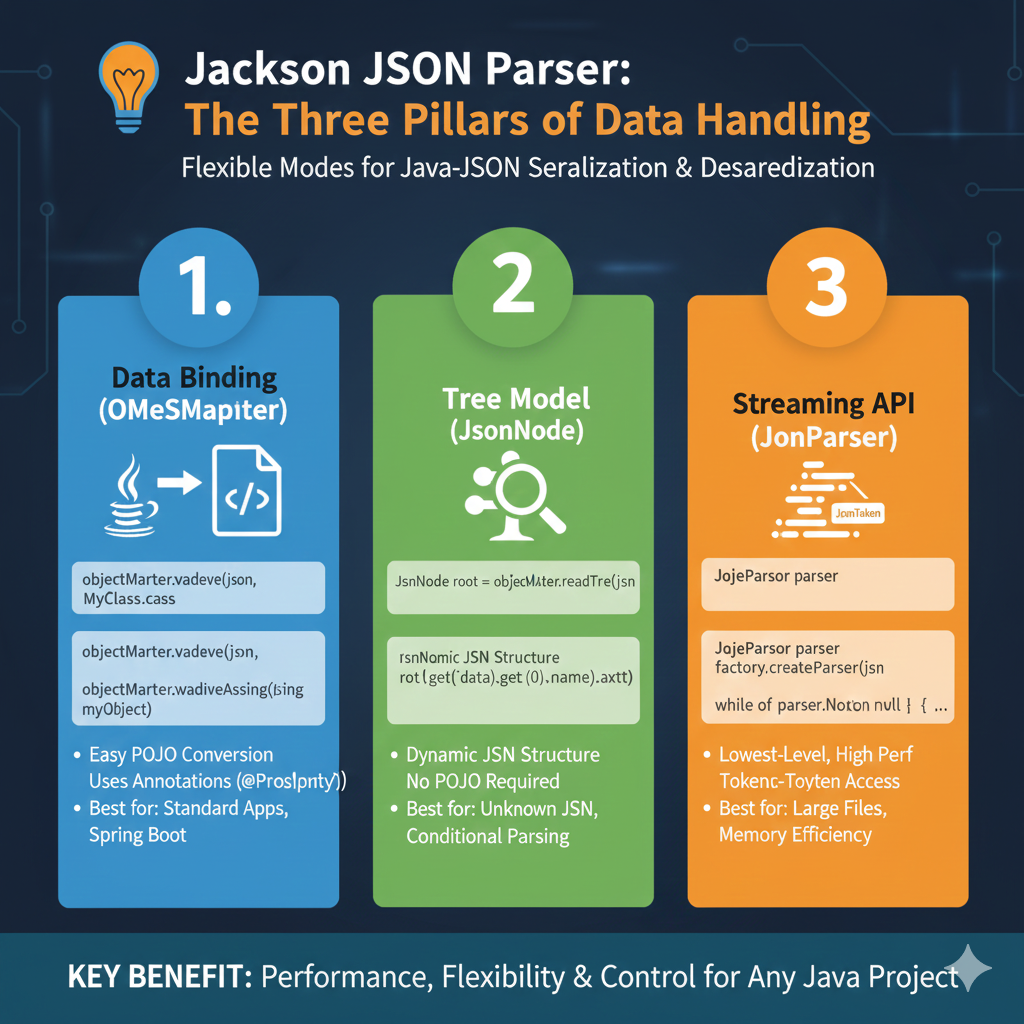
The infographic titled “Jackson JSON Parser: The Three Pillars of Data Handling” outlines the flexible modes available for Java-JSON serialization and deserialization.
☕ The Three Pillars of Jackson
Jackson offers three primary ways to handle data, allowing developers to choose the right balance between ease of use and performance:
1. Data Binding (ObjectMapper)
This is the most common approach for standard Java development:
- Easy POJO Conversion: Automatically maps JSON to Plain Old Java Objects (POJOs).
- Annotation Support: Uses annotations like
@JsonPropertyto customize how fields are handled. - Use Case: Ideal for standard applications and seamless integration with Spring Boot.
2. Tree Model (JsonNode)
This mode provides a hierarchical view of the data without needing predefined classes:
- Dynamic Structure: Allows you to navigate JSON as a tree using nodes (e.g.,
root.get("data").get(0)). - No POJO Required: You can read and manipulate data without creating a matching Java class.
- Use Case: Best for unknown JSON structures or when you only need to perform conditional parsing on small parts of a document.
3. Streaming API (JsonParser)
This is the lowest-level interaction mode for maximum efficiency:
- Token-Based Access: Processes JSON as a stream of tokens, reading one piece at a time.
- High Performance: Offers the fastest processing speeds with the lowest overhead.
- Memory Efficiency: Does not load the entire JSON into memory at once.
- Use Case: Specifically designed for handling large files where memory usage is a critical concern.
learn for more knowledge
Mykeywordrank-> SEO Ranking Checker: Maximizing Your Website Ranking Checker and SEO Ranking with SEOptimer – keyword rank checker
Json web token ->How to Securely Implement and Validate aws jwt and jwt – json web token
Json Compare ->How to Easily Compare Two JSON Online: A Comprehensive Guide – online json comparator
Fake Json –>What Is Dummy API JSON? (Beginner-Friendly Explanation) – fake api
Leave a Reply