JSON (JavaScript Object Notation) has become the de-facto standard for data interchange on the web. While objects are fundamental, JSON arrays are equally crucial for representing lists of data. Learning how to effectively parse JSON arrays is a critical skill for any developer working with APIs or data manipulation.
What is a JSON Array?
A JSON array is an ordered collection of values. In JSON, an array begins with [ (left bracket) and ends with ] (right bracket). Values are separated by , (comma). Each value in an array can be of any JSON data type: a string, a number, a boolean, null, an object, or even another array.
[
  "apple",
  "banana",
  "cherry"
]

[
  {
    "id": 1,
    "name": "Product A"
  },
  {
    "id": 2,
    "name": "Product B"
  }
]
Why is Parsing JSON Arrays Important?
You’ll encounter JSON arrays in numerous scenarios:
- Fetching lists of items from a REST API (e.g., a list of users, products, or blog posts).
- Storing configuration settings that involve multiple options.
- Exchanging data between different services or applications.
- Representing tabular data structures.
How to Parse JSON Arrays in Different Programming Languages
JavaScript
In JavaScript, you can parse a JSON string into a native JavaScript object or array using the JSON.parse() method. Once parsed, you can iterate over the array using standard array methods.
const jsonString = '[{"id": 1, "name": "Item 1"}, {"id": 2, "name": "Item 2"}]';
const data = JSON.parse(jsonString);

console.log("Parsed Array:", data);
// Output: Parsed Array: [ { id: 1, name: 'Item 1' }, { id: 2, name: 'Item 2' } ]

data.forEach(item => {
  console.log(`Item ID: ${item.id}, Name: ${item.name}`);
});
// Output:
// Item ID: 1, Name: Item 1
// Item ID: 2, Name: Item 2
Python
Python’s built-in json module provides functions for working with JSON data. You can use json.loads() to parse a JSON string into a Python list (which is the equivalent of a JSON array).
import json

json_string = '[{"id": 1, "name": "Product A"}, {"id": 2, "name": "Product B"}]'
data = json.loads(json_string)

print("Parsed List:", data)
# Output: Parsed List: [{'id': 1, 'name': 'Product A'}, {'id': 2, 'name': 'Product B'}]

for item in data:
    print(f"Product ID: {item['id']}, Name: {item['name']}")
# Output:
# Product ID: 1, Name: Product A
# Product ID: 2, Name: Product B
Java (using Jackson Library)
For Java, popular libraries like Jackson or Gson are commonly used. Here’s an example using Jackson to parse a JSON array of objects.
import com.fasterxml.jackson.databind.ObjectMapper;
import com.fasterxml.jackson.core.type.TypeReference;
import java.util.List;
import java.util.Map;

public class JsonArrayParser {
    public static void main(String[] args) {
        String jsonString = "[{\"id\": 1, \"name\": \"User One\"}, {\"id\": 2, \"name\": \"User Two\"}]";
        ObjectMapper mapper = new ObjectMapper();

        try {
            List<Map<String, Object>> users = mapper.readValue(jsonString, new TypeReference<List<Map<String, Object>>>() {});

            System.out.println("Parsed List:");
            for (Map<String, Object> user : users) {
                System.out.println("User ID: " + user.get("id") + ", Name: " + user.get("name"));
            }
        } catch (Exception e) {
            e.printStackTrace();
        }
    }
}
Note: You’ll need to add the Jackson library to your project dependencies (e.g., Maven or Gradle).
PHP
PHP offers the json_decode() function to convert a JSON string into a PHP variable. If the JSON string represents an array, it will be converted into a PHP array.
<?php
$jsonString = '[{"id": 1, "city": "New York"}, {"id": 2, "city": "Los Angeles"}]';
$data = json_decode($jsonString, true); // true makes it an associative array

if ($data !== null) {
    echo "<pre>";
    print_r($data);
    echo "</pre>";

    foreach ($data as $item) {
        echo "City ID: " . $item['id'] . ", Name: " . $item['city'] . "<br>";
    }
} else {
    echo "Error decoding JSON.";
}
?>
Best Practices for Parsing JSON Arrays
- Error Handling: Always wrap your parsing logic in try-catch blocks or check for null/false returns. Invalid JSON can crash your application.
- Validation: Before processing, validate that the parsed data structure matches your expectations (e.g., checking if an array is not empty, or if objects within the array have expected keys).
- Type Safety: In statically typed languages, define specific data models (classes/structs) to map JSON objects, providing better type safety and code readability than generic maps.
- Efficient Iteration: Use appropriate looping mechanisms for your language to iterate through array elements efficiently.
Common Pitfalls to Avoid
- Treating an Object as an Array: Accidentally trying to iterate an object (
{}) as if it were an array ([]) will lead to errors. Always know your expected JSON structure. - Empty Arrays: Handle cases where an array might be empty (
[]). Your iteration logic should gracefully manage this. - Nested Arrays: For deeply nested arrays, recursive parsing functions or advanced data mapping techniques might be required.
- Character Encoding: Ensure consistent character encoding (usually UTF-8) when dealing with JSON strings to avoid corruption.
Conclusion
Parsing JSON arrays is a fundamental task in modern web development and data processing. By understanding the structure of JSON arrays and leveraging the appropriate tools and best practices in your preferred programming language, you can efficiently extract and utilize the data you need. Keep these techniques in mind to build robust and reliable applications that seamlessly handle JSON data.
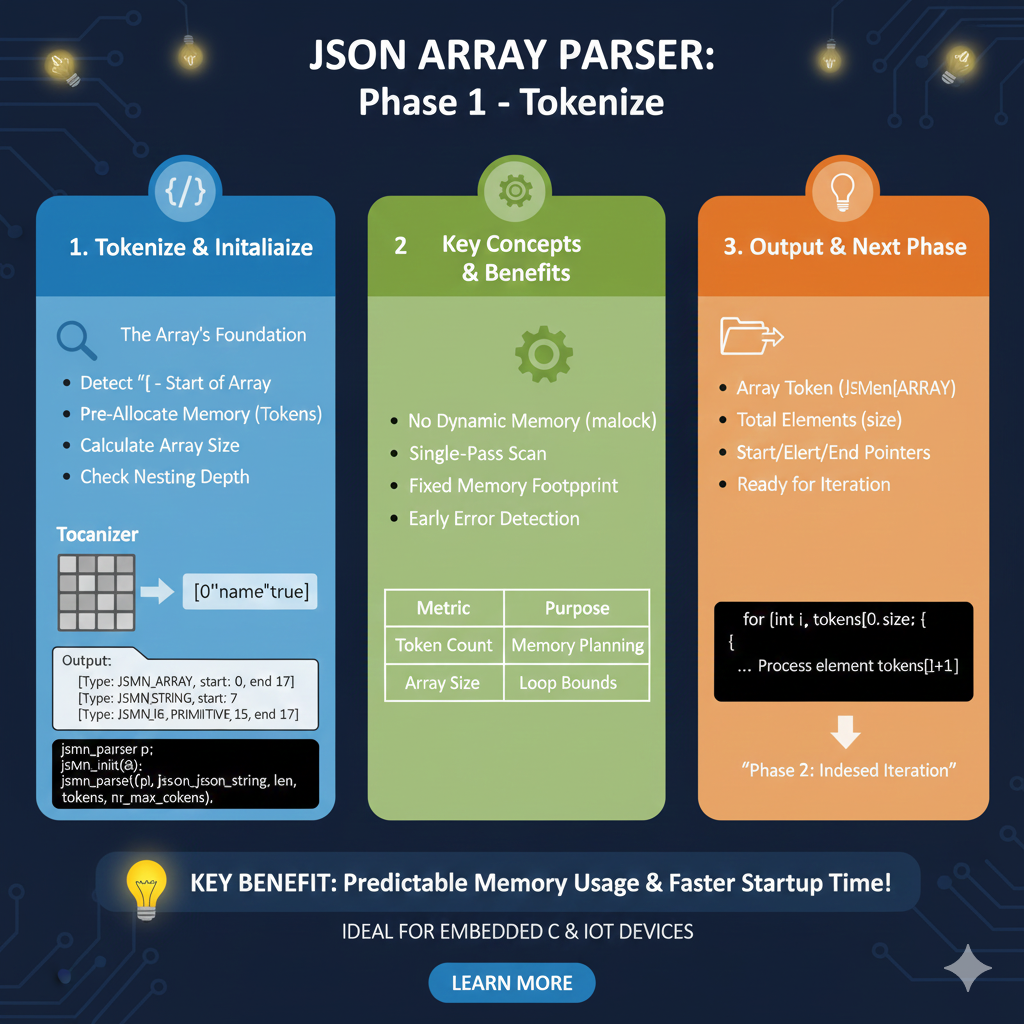
Phase 1: The Tokenization Lifecycle
This phase transforms a raw data stream into a structured, indexed map without the overhead of heavy object models.
1. Tokenize & Initialize (Blue)
This section defines how the parser establishes the array’s foundation:
- Structural Detection: The process begins by detecting the
[character, marking the start of the array. - Memory Management: It uses pre-allocated memory (Tokens) and calculates the total array size during the initial pass.
- Security Checks: The parser checks the nesting depth to prevent stack overflow or memory exhaustion from maliciously crafted files.
- Tokenizer Output: The raw input is broken into typed tokens (e.g.,
JSMN_ARRAY,JSMN_STRING,JSMN_PRIMITIVE) with defined start and end offsets.
2. Key Concepts & Benefits (Green)
This section highlights why this lightweight approach is preferred for C and IoT devices:
- Efficient Processing: Features a single-pass scan with no dynamic memory allocation (
malloc), ensuring a fixed memory footprint. - Reliability: Early error detection catches structural issues before the application attempts to use the data.
- Core Metrics: * Token Count: Used for precise memory planning.
- Array Size: Establishes the loop bounds for the iteration phase.
3. Output & Next Phase (Orange)
The final stage prepares the data for application-level logic:
- Ready for Iteration: The parser outputs a complete
JSMN_ARRAYtoken containing the total element count and pointers to the start and end of the data block. - Code Integration: A standard C-style loop (e.g.,
for (int i, tokens[0].size...)) is used to process each element token sequentially. - Transition: Once tokenization is complete, the system is ready for “Phase 2: Indexed Iteration”.
learn for more knowledge
Mykeywordrank-> SEO Search Optimization-Mastering Search Engine Optimization for Unbeatable Google Rankings – keyword rank checker
json web token->jwt header-The Complete Guide to json web token Metadata – json web token
Json Compare ->json online compare- The Ultimate Guide to json compare online, json diff, and compare online tools – online json comparator
Fake Json –>dummy json online- Mastering fake api Testing with json, json dummy data, jsonplaceholder, and mockaroo – fake api
Leave a Reply