Introduction to JSON Data Parsing
JSON (JavaScript Object Notation) has become the de-facto standard for data interchange on the web. Its lightweight, human-readable format makes it ideal for APIs, configuration files, and data storage. However, to work with JSON data in your applications, you need to parse it – converting the string representation into native data structures that your programming language can understand and manipulate.
This guide will walk you through the process of parsing JSON data, covering popular programming languages and essential best practices to ensure robust and efficient data handling.
What is JSON?
JSON is a text-based data format that represents structured data based on JavaScript object syntax. Despite its name, it is language-independent, meaning virtually every modern programming language has libraries to generate and parse JSON data. It supports two main structures:
- Objects: A collection of name/value pairs (e.g.,
{"name": "John", "age": 30}). - Arrays: An ordered list of values (e.g.,
["apple", "banana", "cherry"]).
Values can be strings, numbers, booleans, null, objects, or arrays.
Why is Parsing JSON Data Important?
When you receive JSON data, for instance, from a web API response, it arrives as a raw string. To access individual pieces of information – like a user’s name, an item’s price, or a list of blog posts – you must parse this string. Parsing transforms the JSON string into an accessible object or array, allowing you to easily read, modify, and utilize the data within your application’s logic.
How to Parse JSON Data in Popular Languages
Let’s explore how to parse JSON data in some of the most widely used programming languages.
Parsing JSON in JavaScript
JavaScript has built-in methods for handling JSON, making it straightforward to work with. The primary method you’ll use is JSON.parse().
Example: Parsing a simple JSON string
const jsonString = '{"name": "Alice", "age": 25, "isStudent": false}';
const data = JSON.parse(jsonString);

console.log(data.name);     // Output: Alice
console.log(data.age);      // Output: 25
console.log(data.isStudent); // Output: false
Handling invalid JSON
If the JSON string is malformed, JSON.parse() will throw a SyntaxError. It’s crucial to use try...catch blocks for error handling.
const invalidJsonString = '{name: "Bob", "age": 30}'; // Missing quotes around 'name'

try {
  const data = JSON.parse(invalidJsonString);
  console.log(data);
} catch (error) {
  console.error('Error parsing JSON:', error.message);
}
Parsing JSON in Python
Python offers excellent support for JSON through its standard library’s json module. The json.loads() function is used to parse JSON strings.
Example: Parsing a JSON string to a Python dictionary
import json

json_string = '{"product": "Laptop", "price": 1200.50, "inStock": true, "features": ["SSD", "8GB RAM"]}'
data = json.loads(json_string)

print(data['product'])    # Output: Laptop
print(data['price'])      # Output: 1200.5
print(data['features'][0]) # Output: SSD
Handling errors in Python
Similar to JavaScript, Python will raise a json.JSONDecodeError for invalid JSON. You should wrap your parsing logic in a try...except block.
import json

invalid_json_string = '{"item": "Book", "quantity": 5,' # Incomplete JSON

try:
  data = json.loads(invalid_json_string)
  print(data)
except json.JSONDecodeError as e:
  print(f"Error parsing JSON: {e}")
Parsing JSON in PHP
PHP provides the json_decode() function to parse JSON strings into PHP variables, typically arrays or objects.
Example: Decoding JSON to a PHP object or associative array
<?php
$jsonString = '{"city": "New York", "population": 8400000, "country": "USA"}';

// Decode as an object (default)
$dataObject = json_decode($jsonString);
echo "City (Object): " . $dataObject->city . "<br>";

// Decode as an associative array
$dataArray = json_decode($jsonString, true);
echo "City (Array): " . $dataArray['city'] . "<br>";
?>
Error checking in PHP
json_decode() returns null if the JSON is invalid. You should always check for errors using json_last_error() and json_last_error_msg().
<?php
$invalidJsonString = '{"user": "Jane", "age": 30, "email": "jane@example.com"'; // Missing closing brace

$data = json_decode($invalidJsonString);

if (json_last_error() !== JSON_ERROR_NONE) {
  echo "Error parsing JSON: " . json_last_error_msg() . "<br>";
} else {
  echo "Parsed data: ";
  print_r($data);
}
?>
Best Practices for JSON Parsing
To ensure your applications handle JSON data robustly and securely, consider these best practices:
- Always Validate JSON: Before parsing, especially when dealing with external or untrusted sources, consider validating the JSON string against a schema (e.g., JSON Schema) to ensure its structure and data types are as expected.
- Implement Robust Error Handling: As shown in the examples, always wrap your JSON parsing logic in
try...catch(JavaScript),try...except(Python), or checks fornullandjson_last_error()(PHP). This prevents your application from crashing due to malformed JSON. - Handle Missing Keys/Properties: After parsing, when accessing data, be prepared for situations where a key might be missing. Use conditional checks or default values to avoid runtime errors (e.g.,
if (data.property) { ... }). - Performance Considerations: For very large JSON files, consider streaming parsers (if available in your language/framework) to process data incrementally, reducing memory consumption and improving performance.
- Security: Be cautious when parsing JSON from untrusted sources, especially if your application directly evaluates parts of the JSON content. While
JSON.parse()is generally safe in JavaScript as it doesn’t execute arbitrary code, other methods or frameworks might have different implications.
Conclusion
Parsing JSON data is a fundamental skill for any developer working with modern web technologies. By understanding how to effectively use built-in functions like JSON.parse(), json.loads(), and json_decode(), along with implementing best practices for error handling and validation, you can confidently integrate and manipulate data within your applications. Start practicing these techniques today to become proficient in handling JSON data like a pro!
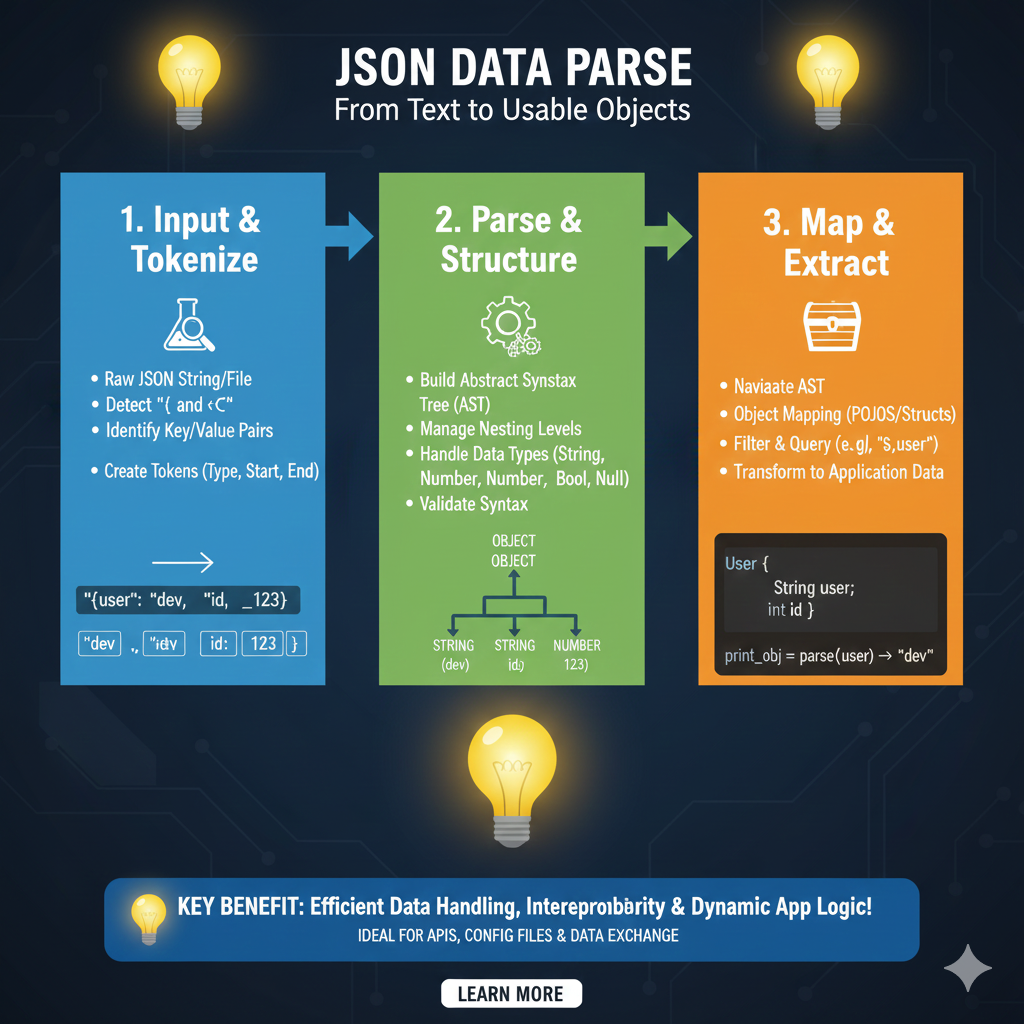
The Data Transformation Lifecycle
The workflow is divided into three critical technical phases that ensure data is valid, structured, and ready for use:
1. Input & Tokenize (Blue)
This initial phase handles the raw ingestion of data:
- Source Material: Processes raw JSON strings or files.
- Structural Detection: The parser scans for characters like
{and[to identify objects and arrays. - Lexical Analysis: It identifies key-value pairs and breaks the text into individual Tokens.
- Metadata Tagging: Each token is assigned a type and marked with its specific start and end points within the source text.
2. Parse & Structure (Green)
In this stage, the linear tokens are organized into a hierarchical format:
- AST Generation: The parser builds an Abstract Syntax Tree (AST), which visually represents the relationship between nested objects and values.
- Type Management: The system distinguishes between different data types such as Strings, Numbers, Booleans, and Nulls.
- Integrity Checks: Validates syntax and manages nesting levels to ensure the structure is safe and compliant with JSON standards.
3. Map & Extract (Orange)
The final phase makes the data accessible to the developer’s application code:
- Navigation: Allows developers to navigate the AST to find specific data points.
- Object Mapping: Maps JSON data directly to application-specific structures, such as POJOs (Plain Old Java Objects) or C# Structs.
- Querying: Supports targeted extraction using filters or path-based queries (e.g., fetching a specific user field).
- Final Transformation: Converts the raw parsed data into live application data ready for logic execution.
learn for more knowledge
Mykeywordrank-> SEO Search Engine Optimization: Mastering the Search Engine for Traffic – keyword rank checker
json web token->Understand JWT-The Complete Guide to JSON Web Token and Web Token Security – json web token
Json Compare ->api response comparison tool – The Ultimate Guide to compare with a json compare tool and json diff tool – online json comparator
Fake Json –>How to Utilize dummy json rest api for Rapid Front-End Development and fake rest api Testing – fake api
Leave a Reply