Understanding how to use a json file parser is a cornerstone skill for modern web development. Whether you are dealing with a complex json format or a simple json object, knowing how to json parse data effectively allows you to build more robust applications. This guide will help you master the json.parse method and explore tools like a json editor online to streamline your workflow.
What is a JSON File and JSON Format?
A file json is a lightweight data-interchange format that is easy for humans to read and machines to parse.1 Unlike xml, which uses tags, the json format is built on two primary structures:2
- JSON Object: A collection of key/value pairs.3
- JSON String / Array: An ordered list of values or tokens.4
When you use json parse on a json string, you are essentially converting that text into a usable data object.5 This is far more efficient than older xml parsers, especially when handling large json data sets.6
How to JSON Parse in Different Environments
JavaScript: Using JSON.parse and JSON Stringify
In JavaScript, the json.parse() static method is the standard way to turn a json string into an object.7 Conversely, if you need to turn an object back into a string, you would use json stringify.
JavaScript
// Example: use json parse to handle an input string
const input = '{"name": "Alice", "status": "active"}';
const data = JSON.parse(input); // This function creates a JavaScript object
console.log(data.name);

// Use json stringify to prepare data for a file
const stringData = JSON.stringify(data);
Python: Python Demo Script That Parses Them
If you are working with json files in Python, the built-in json library acts as your primary json file parser. Here is a python demo script that parses them:
Python
import json

# Loading a file json
with open('config.json', 'r') as file:
    json_data = json.load(file) # Parse file into a dictionary
    print(json_data['key'])
Advanced Tools: JSON Editor Online and JSMN
For developers who need to visualize and editor their json data quickly, a json editor online is an invaluable tool. An online json editor provides a clean interface to input raw text and view the resulting json object structure, making it easier to spot an error in your tokens.8
If you are working in a resource-constrained environment (like C), you might look into jsmn. jsmn is a world-class, minimalistic json file parser that is designed to be highly portable and doesn’t require dynamic memory allocation.
Key Components of the JSON File Parser Process
| Component | Description |
| Input | The raw json string or file being processed. |
| Tokens | The basic units (brackets, keys, values) identified by the parser. |
| Validation | Ensuring the json format is correct and free of error. |
| Object | The final data structure (map, dictionary, or array) produced. |
Best Practices for Using a JSON File Parser
- Handle Every Error: Malformed files are common. Always wrap your json.parse logic in a way that catches syntax errors.
- Validation: Before you parse, ensure the input matches your expected schema.
- Use an Editor: For debugging, paste your json data into a json editor to check for missing commas or mismatched braces.9
- Avoid XML for Web APIs: Unless required, stick to json as it is natively supported by the json.parse() static function in browsers.
Conclusion
Whether you are using a python demo script that parses them or leveraging the native json.parse in JavaScript, mastering the json file parser workflow is essential. Using a json editor online can help you visualize your json data and ensure your json format is perfect every time.
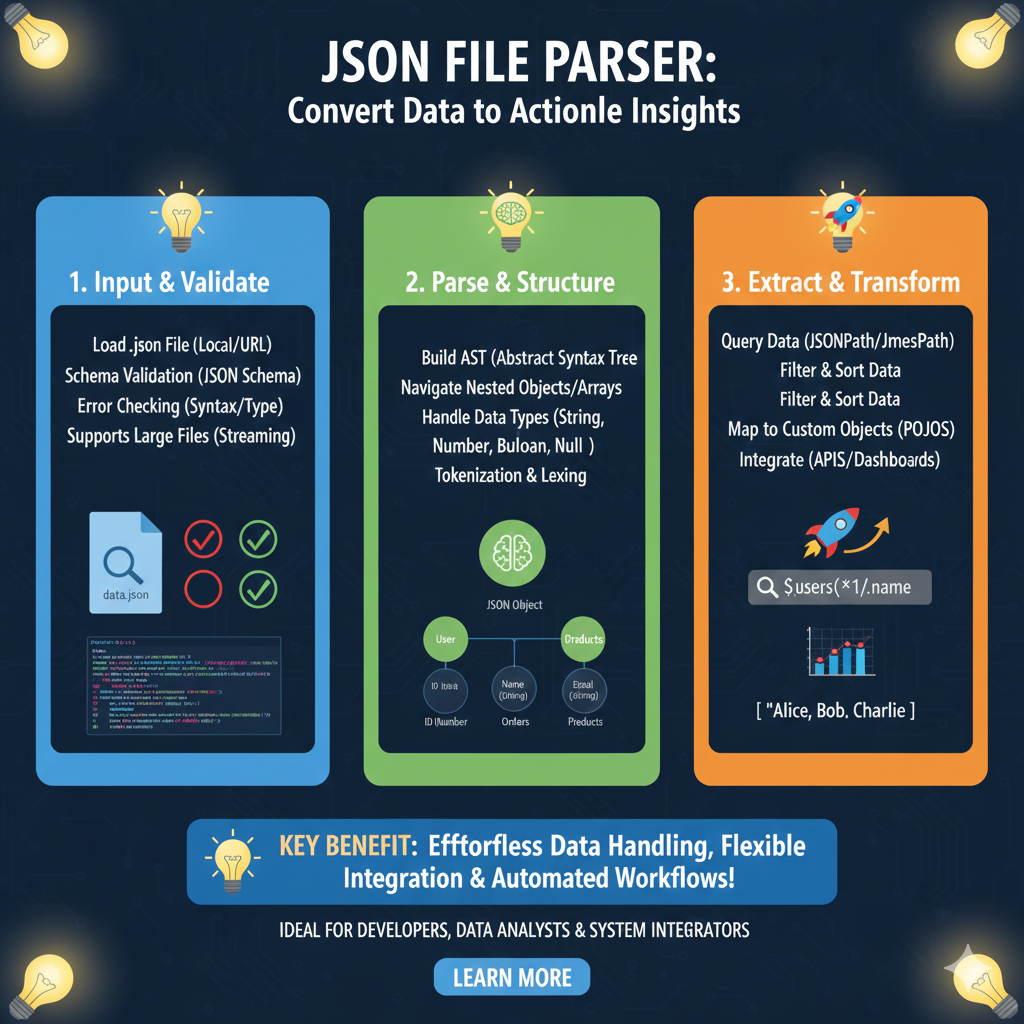
The JSON Parsing & Transformation Workflow
The tool breaks down the complex task of data handling into three manageable phases:
1. Input & Validate (Blue)
This initial stage ensures the data is clean and ready for processing:
- Flexible Loading: Users can load
.jsonfiles from local storage or direct URLs. - Integrity Checks: The parser performs Schema Validation and checks for syntax or type errors.
- Scalability: It includes support for Streaming, allowing it to handle very large files without performance lag.
2. Parse & Structure (Green)
This section details how the tool interprets the data hierarchy:
- AST Building: The tool constructs an Abstract Syntax Tree (AST) to understand the data’s logical structure.
- Deep Navigation: Easily navigate through nested objects and arrays.
- Type Handling: It identifies and processes various data types, including Strings, Numbers, Booleans, and Nulls.
- Internal Mechanics: Utilizes Tokenization and Lexing to break down the raw code into meaningful parts.
3. Extract & Transform (Orange)
The final stage focuses on pulling specific data for use in other applications:
- Advanced Querying: Users can search for specific data points using JSONPath or JmesPath.
- Data Manipulation: Includes tools to Filter and Sort the data to meet specific requirements.
- Object Mapping: Map raw JSON data into custom objects (like POJOs) for easier programming integration.
- Ecosystem Integration: Directly feed the parsed data into APIs or visual dashboards.
learn for more knowledge
Mykeywordrank-> SEO Search Engine Optimization: Mastering the Search Engine for Traffic – keyword rank checker
json web token->jwt spring boot: How to Secure Your spring boot APIs with jwt authentication and jwt token – json web token
Json Compare ->How to Effectively Use a JSON Compare Tool for Data Analysis – online json comparator
Fake Json –>How to Easily Use Dummy JSON URL for Efficient Testing and Development – fake api
Leave a Reply