How to Parse JSON Format Effectively: A Comprehensive Guide
In today’s data-driven world, JSON (JavaScript Object Notation) has become the de facto standard for exchanging data between web services and applications. Its lightweight, human-readable format makes it incredibly popular among developers. But simply receiving JSON data isn’t enough; you need to know how to parse it correctly to extract the information you need. This guide will walk you through the essential steps and techniques for parsing JSON format effectively across various programming languages.
What is JSON? A Quick Overview
JSON is a text-based data interchange format that is easy for humans to read and write, and easy for machines to parse and generate. It is built on two structures:
- A collection of name/value pairs (e.g., an object in JavaScript, a dictionary in Python, a hash table).
- An ordered list of values (e.g., an array in JavaScript, a list in Python).
A typical JSON structure might look like this:
{
  "name": "John Doe",
  "age": 30,
  "isStudent": false,
  "courses": ["History", "Math"],
  "address": {
    "street": "123 Main St",
    "city": "Anytown"
  }
}
Why is Parsing JSON Important?
Parsing JSON is crucial because raw JSON data is just a string. To interact with it, access its values, or manipulate its structure, you need to convert this string into a native data structure that your programming language can understand and work with. This allows you to easily retrieve specific pieces of information, update values, or even transform the data into another format.
How to Parse JSON in Popular Programming Languages
1. JavaScript
JavaScript has built-in support for JSON through its JSON object.
Parsing a JSON String:
Use JSON.parse() to convert a JSON string into a JavaScript object.
const jsonString = '{"name": "Alice", "age": 25}';
const jsObject = JSON.parse(jsonString);

console.log(jsObject.name); // Output: Alice
console.log(jsObject.age);  // Output: 25
Converting a JavaScript Object to JSON:
Use JSON.stringify() to convert a JavaScript object into a JSON string.
const jsObjectToSend = { product: "Laptop", price: 1200 };
const jsonStringToSend = JSON.stringify(jsObjectToSend);

console.log(jsonStringToSend); // Output: {"product":"Laptop","price":1200}
2. Python
Python’s standard library includes the json module for working with JSON data.
Parsing a JSON String:
Use json.loads() (load string) to convert a JSON string into a Python dictionary or list.
import json

json_string = '{"city": "New York", "population": 8000000}'
python_dict = json.loads(json_string)

print(python_dict["city"])        # Output: New York
print(python_dict["population"])  # Output: 8000000
Parsing JSON from a File:
Use json.load() (load from file object) to read JSON data directly from a file.
import json

# Assuming 'data.json' contains: {"country": "USA"}
with open('data.json', 'r') as file:
    data = json.load(file)

print(data['country']) # Output: USA
Converting a Python Object to JSON:
Use json.dumps() (dump string) to convert a Python dictionary or list into a JSON string.
import json

python_object = {"item": "Book", "quantity": 3}
json_output_string = json.dumps(python_object, indent=2) # indent for pretty printing

print(json_output_string)
# Output:
# {
#   "item": "Book",
#   "quantity": 3
# }
3. Java
While Java doesn’t have built-in JSON parsing, libraries like Jackson or Gson are widely used.
Using Jackson (Maven dependency):
<dependency>
    <groupId>com.fasterxml.jackson.core</groupId>
    <artifactId>jackson-databind</artifactId>
    <version>2.13.0</version>
</dependency>
Parsing a JSON String:
import com.fasterxml.jackson.databind.JsonNode;
import com.fasterxml.jackson.databind.ObjectMapper;

public class JsonParserJava {
    public static void main(String[] args) {
        String jsonString = "{\"product\": \"Keyboard\", \"price\": 75.50}";
        ObjectMapper mapper = new ObjectMapper();

        try {
            JsonNode rootNode = mapper.readTree(jsonString);
            String product = rootNode.get("product").asText();
            double price = rootNode.get("price").asDouble();

            System.out.println("Product: " + product); // Output: Product: Keyboard
            System.out.println("Price: " + price);     // Output: Price: 75.5
        } catch (Exception e) {
            e.printStackTrace();
        }
    }
}
4. PHP
PHP offers built-in functions for JSON handling.
Parsing a JSON String:
Use json_decode() to convert a JSON string into a PHP object or associative array.
<?php
$jsonString = '{"user": "Bob", "isAdmin": true}';
$phpObject = json_decode($jsonString); // Returns an object

echo $phpObject->user; // Output: Bob

$phpArray = json_decode($jsonString, true); // Returns an associative array

echo $phpArray['isAdmin'] ? 'Yes' : 'No'; // Output: Yes
?>
Converting a PHP Object/Array to JSON:
Use json_encode() to convert a PHP array or object into a JSON string.
<?php
$phpData = array(
    "city" => "London",
    "country" => "UK"
);
$jsonOutput = json_encode($phpData);

echo $jsonOutput; // Output: {"city":"London","country":"UK"}
?>
Best Practices for JSON Parsing
- Validate Your JSON: Always ensure the JSON you receive is well-formed before attempting to parse it. Many online tools and IDEs offer JSON validation.
- Handle Errors Gracefully: Parsing can fail due to malformed JSON, network issues, or unexpected data. Implement try-catch blocks or check return values (like
json_last_error()in PHP) to manage these situations without crashing your application. - Understand Data Types: JSON has specific data types (string, number, boolean, null, object, array). Be aware of how your language maps these to its native types to avoid unexpected behavior.
- Use Appropriate Libraries: Leverage robust, well-maintained JSON parsing libraries specific to your programming language. They handle edge cases and performance considerations.
- Consider Schemas for Complex Data: For very complex or critical JSON structures, consider using JSON Schema to define and validate the expected structure and types of your data.
Conclusion
Parsing JSON format is a fundamental skill for any modern developer. By understanding the core concepts and utilizing the right tools and techniques in your preferred programming language, you can efficiently extract, manipulate, and work with JSON data, making your applications more robust and data-ready. Always remember to validate your input and handle potential errors for a seamless user experience.
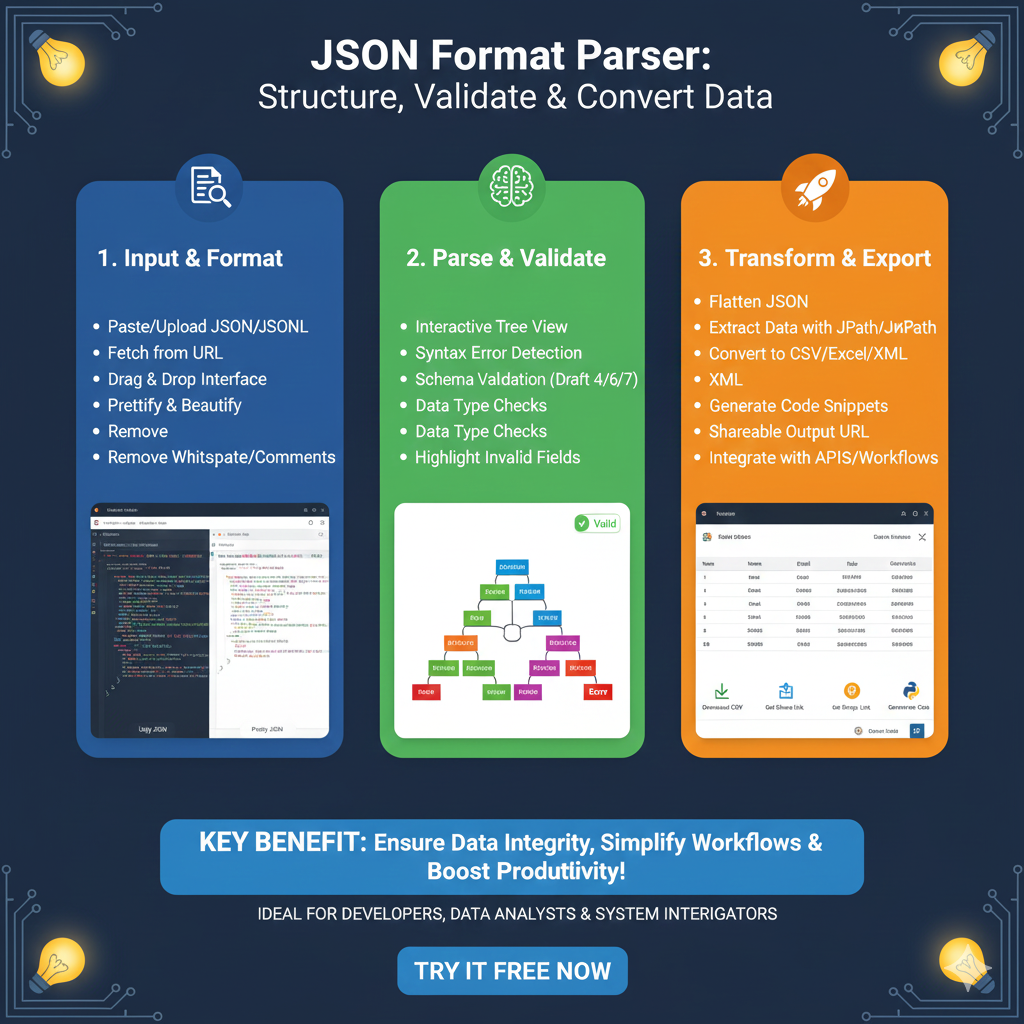
The JSON Formatting and Parsing Workflow
This systematic approach is designed for developers, data analysts, and system integrators to handle complex data structures efficiently:
1. Input & Format (Blue)
The first stage focuses on importing and cleaning raw data for better visibility:
- Multiple Ingestion Methods: Users can Paste or Upload JSON/JSONL files, or Fetch from URL directly.
- Ease of Entry: Includes a Drag & Drop Interface for fast file handling.
- Data Cleaning: Features a Prettify & Beautify tool alongside the ability to Remove Whitespace and Comments to sanitize the code.
2. Parse & Validate (Green)
The middle stage ensures the data is logically sound and error-free:
- Structural Exploration: Offers an Interactive Tree View to navigate nested objects.
- Integrity Checks: Performs Syntax Error Detection and Schema Validation (supporting Drafts 4, 6, and 7).
- Quality Assurance: Includes automated Data Type Checks and the ability to Highlight Invalid Fields for rapid debugging.
3. Transform & Export (Orange)
The final stage prepares the validated data for use in various applications:
- Structural Modification: Allows users to Flatten JSON for simpler data processing.
- Targeted Extraction: Features tools to Extract Data with JPath or JSONPath queries.
- Versatile Output: Enables conversion to CSV, Excel, or XML formats and generates Code Snippets for developers.
- Connectivity: Provides a Shareable Output URL and allows for direct Integration with APIs and Workflows.
learn for more knowledge
Mykeywordrank-> Search for SEO: The Ultimate Guide to Keyword Research and SEO Site Checkup – keyword rank checker
json web token->React JWT: How to Build a Secure React Application with JSON Web Token – json web token
Json Compare ->Compare JSON Data Using a JSON Compare Tool for JSON Data – online json comparator
Fake Json –>dummy user data json- The Ultimate Guide to fake api, jsonplaceholder, and placeholder json data – fake api
Leave a Reply