What is a JSON Parse Tool and Why Do You Need One?
JSON (JavaScript Object Notation) has become the de facto standard for data interchange on the web, powering APIs, configuration files, and countless applications. While its human-readable format makes it easy to understand simple structures, dealing with large, complex, or malformed JSON data can quickly become a daunting task. This is where a dedicated JSON parse tool becomes indispensable.
A JSON parse tool is an application or library designed to process JSON strings. It can validate the syntax, pretty-print (format) unreadable JSON, query specific data points, and even transform JSON structures. For developers, data analysts, and anyone regularly interacting with JSON, mastering such a tool is crucial for efficiency and accuracy.
How to Use a JSON Parse Tool: Your Step-by-Step Guide
Whether you’re debugging an API response, analyzing data logs, or simply trying to understand a complex JSON file, knowing how to parse JSON effectively will save you immense time. Here’s a look at common methods and tools.
Online JSON Parsers
Online JSON parse tools are perhaps the easiest way to quickly inspect JSON data without installing any software. Many websites offer services to validate, format, and even query JSON.
- Step 1: Navigate to a reputable online JSON parser (e.g., jsonformatter.org, jsoneditoronline.org).
- Step 2: Paste your JSON string into the provided input area.
- Step 3: Click the ‘Process’, ‘Format’, or ‘Validate’ button.
- Step 4: The tool will typically display the formatted JSON, highlight errors, or allow you to navigate through the data structure.
These tools are excellent for quick checks and for sharing formatted JSON.
Command-Line Tools (e.g., jq)
For those working in a terminal environment, powerful command-line utilities like jq offer incredible flexibility for parsing, filtering, and manipulating JSON data directly from the command line.
# Example: Pretty-print a JSON file
cat data.json | jq .

# Example: Extract a specific field
curl 'https://api.example.com/data' | jq '.user.name'

# Example: Filter an array
cat users.json | jq '.[] | select(.age > 30)'
jq is a lightweight and flexible command-line JSON processor that allows you to slice, filter, map, and transform structured data with ease.
Programmatic JSON Parsing
When you need to integrate JSON parsing into your applications, most programming languages offer built-in libraries or external modules.
Python Example:
import json

json_string = '{"name": "Alice", "age": 30, "isStudent": false, "courses": ["Math", "Science"]}'

data = json.loads(json_string)

print(data['name'])
print(data['courses'][0])
JavaScript Example:
const jsonString = '{"name": "Bob", "age": 25, "isStudent": true, "courses": ["History", "Art"]}';

const data = JSON.parse(jsonString);

console.log(data.name);
console.log(data.courses[1]);
These programmatic approaches are essential for dynamic data handling within your software.
Key Features to Look for in a JSON Parse Tool
When selecting a JSON parse tool, consider these functionalities:
- JSON Validation: Ensures your JSON is syntactically correct.
- Pretty Printing/Formatting: Converts minified or unreadable JSON into a well-indented, hierarchical structure.
- Tree View/Viewer: Provides an interactive, collapsible tree representation of the JSON data.
- Search and Filter: Allows you to quickly find specific keys or values within large JSON payloads.
- Data Transformation: Enables modification, addition, or deletion of JSON elements.
- Schema Validation: Checks JSON against a predefined schema to ensure data conformity.
Boosting Your Workflow with an Efficient JSON Parser
Integrating a reliable JSON parser into your daily workflow can significantly enhance productivity. It streamlines the debugging process for API integrations, simplifies data exploration, and ensures the integrity of your data structures. Whether you prefer a quick online check, a powerful command-line utility, or robust programming libraries, understanding and utilizing these tools is a fundamental skill in today’s data-driven world.
Conclusion
From simple validation to complex data manipulation, a quality JSON parse tool is an indispensable asset for anyone working with JSON. By understanding the various types of tools available and how to use them, you can significantly reduce errors, save time, and maintain a smoother development and data analysis workflow. Choose the tool that best fits your needs and start parsing JSON with confidence!
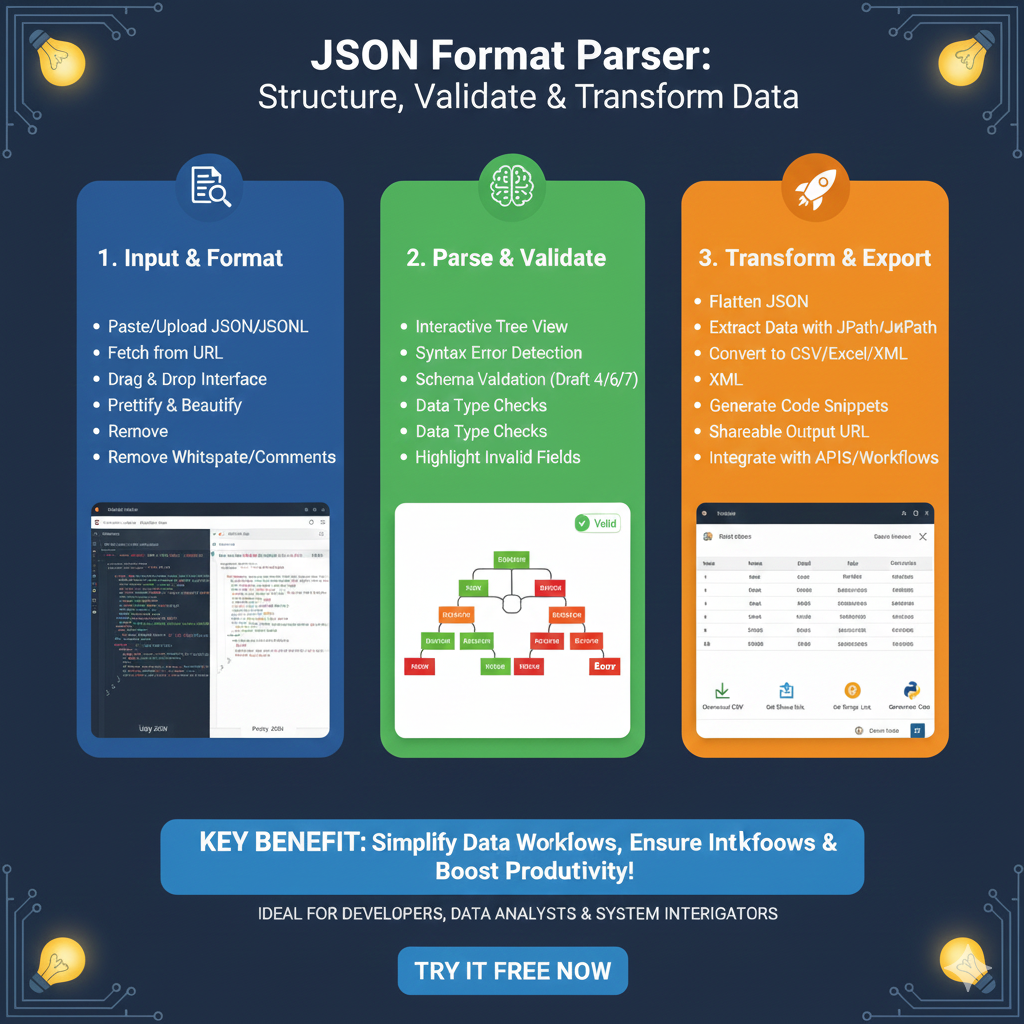
The infographic titled “JSON Format Parser: Structure, Validate & Transform Data” serves as a comprehensive guide for developers and data analysts to manage, clean, and convert JSON data effectively.
🛠️ The JSON Parsing & Transformation Lifecycle
The workflow is divided into three critical stages designed to simplify data management and ensure high productivity:
1. Input & Format (Blue)
This initial phase focuses on bringing raw data into a readable environment:
- Flexible Ingestion: Support for pasting or uploading JSON/JSONL files, as well as fetching from a URL.
- User-Friendly Interface: Includes a Drag & Drop feature for quick file processing.
- Data Sanitization: Tools to Prettify & Beautify messy code, alongside options to remove whitespace and comments to clean the dataset.
2. Parse & Validate (Green)
The second stage ensures the data is accurate and follows standard protocols:
- Visual Exploration: An Interactive Tree View allows users to navigate complex, nested data structures visually.
- Error Prevention: Features Syntax Error Detection and robust Schema Validation (supporting Drafts 4, 6, and 7).
- Field-Level Accuracy: Automated Data Type Checks help highlight invalid fields, making debugging significantly faster.
3. Transform & Export (Orange)
The final stage prepares the data for external use and integration:
- Advanced Re-structuring: Ability to Flatten JSON for easier processing in tabular formats.
- Data Extraction: Users can target specific information using JPath or JSONPath queries.
- Universal Compatibility: Convert cleaned JSON into CSV, Excel, or XML and generate code snippets for direct use in development.
- Seamless Sharing: Provides a shareable output URL and integrates directly with APIs and automated workflows.
learn for more knowledge
Mykeywordrank-> Search for SEO: The Ultimate Guide to Keyword Research and SEO Site Checkup – keyword rank checker
json web token->React JWT: How to Build a Secure React Application with JSON Web Token – json web token
Json Compare ->Compare JSON Data Using a JSON Compare Tool for JSON Data – online json comparator
Fake Json –>dummy user data json- The Ultimate Guide to fake api, jsonplaceholder, and placeholder json data – fake api
Leave a Reply