Understanding JSON and the Need for Parsing
JSON (JavaScript Object Notation) has become the de facto standard for data exchange on the web due to its lightweight nature and human-readable format. From RESTful APIs to configuration files, JSON is everywhere. However, raw JSON data, while easy for humans to read, needs to be converted into structured objects or data types that your programming language can understand and manipulate. This conversion process is known as parsing.
A JSON Parser API provides the tools and functions necessary to deserialize JSON strings into native data structures (like objects, dictionaries, or lists) and serialize native data structures back into JSON strings. Without a robust parser, working with JSON data would be a tedious and error-prone manual process.
What is a JSON Parser API?
At its core, a JSON Parser API is a library or module that offers functionalities to:
- Deserialize JSON: Convert a JSON string into programming language-specific data structures.
- Serialize JSON: Convert programming language-specific data structures into a JSON string.
- Validate JSON: Check if a given string adheres to the JSON format specification.
These APIs abstract away the complexities of handling different JSON data types (strings, numbers, booleans, null, objects, arrays) and provide a consistent interface for developers.
How to Choose the Right JSON Parser API
Selecting the appropriate JSON parser API can significantly impact your application’s performance, development time, and maintainability. Consider the following factors:
Language Support:Ensure the API is well-supported and optimized for your primary programming language (e.g., JavaScript, Python, Java, C#, PHP, Go).
Performance and Efficiency:For applications handling large volumes of JSON data, parsing speed and memory footprint are critical. Benchmark different parsers if performance is a key concern.
Ease of Use and Documentation:A well-documented API with a simple, intuitive interface will accelerate development and reduce the learning curve.
Error Handling:The parser should provide clear and informative error messages when encountering malformed JSON, allowing for robust error recovery
Community Support and Maintenance:Active community support and regular updates indicate a healthy and reliable API. This is crucial for long-term project stability.
Popular JSON Parser APIs and Examples
JavaScript (Browser/Node.js)
JavaScript has built-in JSON support, making parsing incredibly straightforward.
const jsonString = '{"name": "Alice", "age": 30, "isStudent": false, "courses": ["Math", "Science"]}';

// Deserialize JSON string to JavaScript object
const jsonObject = JSON.parse(jsonString);
console.log(jsonObject.name); // Output: Alice

// Serialize JavaScript object to JSON string
const newObject = { id: 101, product: 'Laptop' };
const newJsonString = JSON.stringify(newObject);
console.log(newJsonString); // Output: {"id":101,"product":"Laptop"}
Python
Python’s standard library includes the json module for handling JSON data.
import json

json_string = '{"city": "New York", "population": 8400000, "landmarks": ["Statue of Liberty", "Empire State Building"]}';

# Deserialize JSON string to Python dictionary
data = json.loads(json_string)
print(data['city']) # Output: New York

# Serialize Python dictionary to JSON string
new_data = {'item': 'Book', 'price': 25.99}
new_json_string = json.dumps(new_data, indent=2)
print(new_json_string)
Java
Java developers often use third-party libraries like Gson or Jackson for robust JSON parsing. Here’s an example using Gson:
import com.google.gson.Gson;
import com.google.gson.GsonBuilder;

public class JsonParsingExample {
    public static void main(String[] args) {
        String jsonString = "{\"firstName\": \"John\", \"lastName\": \"Doe\", \"age\": 25}";

        // Create a Gson instance
        Gson gson = new Gson();

        // Deserialize JSON string to a Java object (e.g., a Map or a custom class)
        // For simplicity, let's use a Map here
        java.util.Map<String, Object> person = gson.fromJson(jsonString, java.util.Map.class);
        System.out.println("First Name: " + person.get("firstName")); // Output: First Name: John

        // Serialize a Java object to a JSON string
        java.util.Map<String, String> product = new java.util.HashMap<>();
        product.put("name", "Keyboard");
        product.put("price", "75.00");

        String productJson = gson.toJson(product);
        System.out.println(productJson); // Output: {"name":"Keyboard","price":"75.00"}

        // Pretty printing JSON
        Gson prettyGson = new GsonBuilder().setPrettyPrinting().create();
        String prettyProductJson = prettyGson.toJson(product);
        System.out.println(prettyProductJson);
    }
}
Best Practices for Using JSON Parser APIs
Handle Malformed JSON Gracefully:Always wrap parsing operations in try-catch blocks or use appropriate error handling mechanisms to prevent application crashes from invalid JSON input.
Optimize for Large Payloads:For very large JSON files, consider stream parsing (SAX-like parsers) instead of DOM-like parsers that load the entire JSON into memory, which can lead to out-of-memory errors.
Secure Deserialization:Be cautious when deserializing JSON from untrusted sources, especially in languages that allow object deserialization into arbitrary classes. This can be a security vulnerability.
Leverage Schema Validation:For critical data exchanges, use JSON Schema to validate the structure and data types of incoming JSON payloads before parsing them, ensuring data integrity.
Conclusion
JSON Parser APIs are indispensable tools for modern web development, facilitating seamless data exchange between disparate systems. By understanding their functionality, choosing the right API for your needs, and adhering to best practices, you can build more robust, efficient, and scalable applications. Whether you’re working with a built-in language feature or a powerful third-party library, mastering your JSON parser API is a key skill in today’s API-driven world.
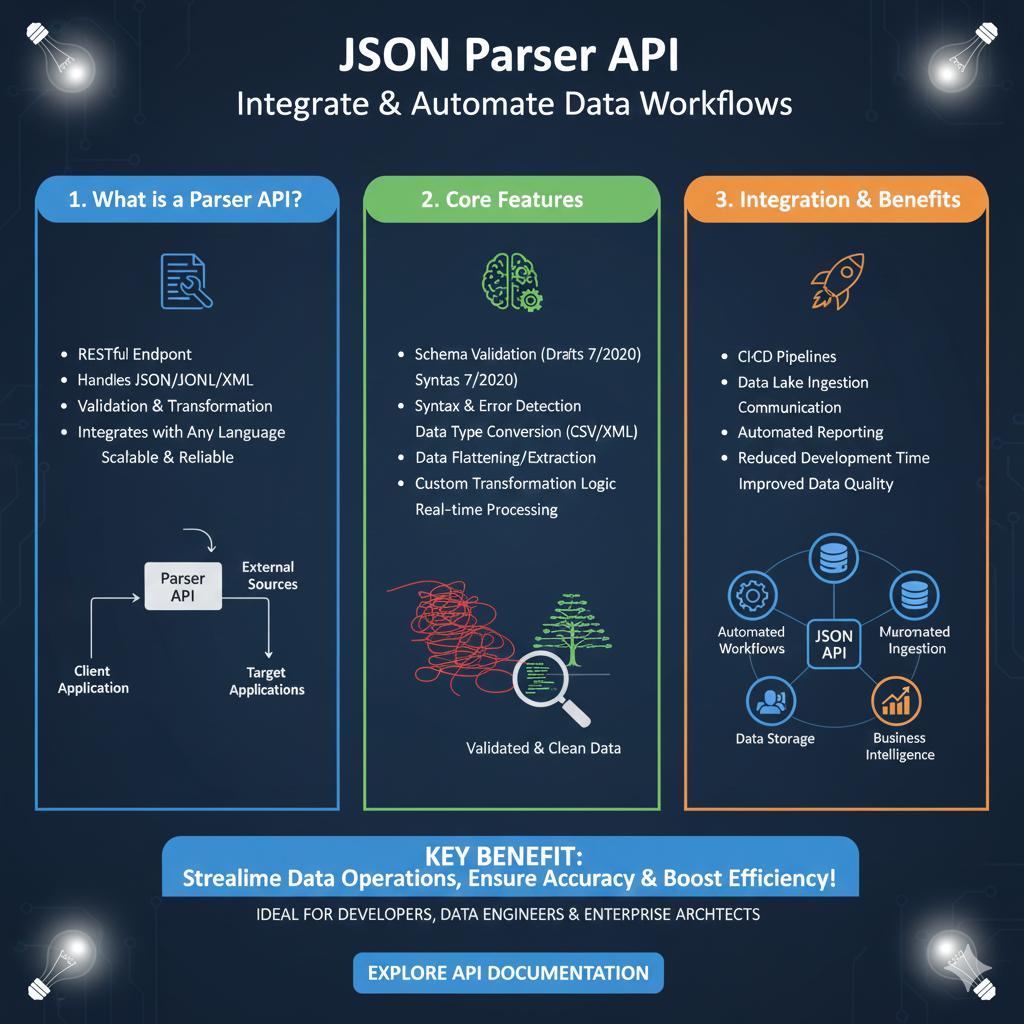
Streamlining Data Operations with Parser APIs
This guide is organized into three sections covering the definition, core technical capabilities, and organizational benefits of a JSON Parser API:
1. What is a Parser API? (Blue)
This module introduces the API as a central hub for data management:
- Universal Interface: Functions as a RESTful Endpoint that handles JSON, JSONL, and XML formats.
- Comprehensive Processing: Manages both Validation and Transformation of data packets.
- Language Agnostic: Integrates with any programming language, providing a scalable and reliable solution for cross-platform development.
- Visual Architecture: Displays a flow where a Client Application sends data to the Parser API, which then distributes it to External Sources or Target Applications.
2. Core Features (Green)
This section highlights the intelligent data-handling tools built into the API:
- Advanced Validation: Supports Schema Validation (specifically mentioning Drafts 7 and 2020 standards).
- Error Management: Includes robust Syntax & Error Detection to prevent data corruption.
- Data Conversion: Enables Data Type Conversion to formats like CSV or XML, along with Data Flattening and Extraction.
- Real-time Logic: Allows for Custom Transformation Logic and Real-time Processing to ensure high-velocity data delivery.
3. Integration & Benefits (Orange)
The final pillar explores how the API improves technical ecosystems and business intelligence:
- Development Speed: Significantly reduces development time and improves data quality.
- Automation: Facilitates Automated Reporting and integrates directly into CI/CD Pipelines.
- System Ecosystem: A central diagram shows the API connecting Automated Workflows, Data Lake Ingestion, Data Storage, and Business Intelligence
learn for more knowledge
Mykeywordrank-> Search for SEO: The Ultimate Guide to Keyword Research and SEO Site Checkup – keyword rank checker
json web token->jwt react Authentication: How to Secure Your react app with jwt authentication – json web token
Json Compare ->compare json online free: Master json compare online with the Best json compare tool and online json Resources – online json comparator
Fake Json –>fake api jwt json server: Create a free fake rest api with jwt authentication – fake api
Leave a Reply