Introduction: The Need for Speed in Python JSON Parsing
JSON (JavaScript Object Notation) is ubiquitous in modern web development, data exchange, and APIs. Python’s built-in json module handles JSON parsing and serialization efficiently for most use cases. However, when dealing with large volumes of data or high-throughput applications, the performance of the default JSON library can become a bottleneck. This guide explores how to achieve the fastest JSON parser Python, comparing built-in json solutions with powerful external libraries like orjson and msgspec, and providing ‘how-to’ examples for optimizing your parsing workflow.
The Built-in JSON Module (Standard Python JSON Library)
Python’s standard library includes the json module, which provides robust and reliable JSON encoding and decoding. It’s an excellent default choice due to its stability and broad compatibility across all CPython versions.
Using the json Module to Parse JSON
Here’s a quick look at how to use the json.loads function to parse a JSON string:
Python
import json

json_string = '{"name": "Alice", "age": 30, "is_student": false}'
data = json.loads(json_string) # The standard way to load JSON data
print(data)
# Output: {'name': 'Alice', 'age': 30, 'is_student': False}
While perfectly functional, the json library is written purely in Python. This means it might not always keep pace with applications requiring extreme performance when processing huge JSON payloads, which is why external JSON libraries are necessary.
Faster Alternatives: Ujson, Orjson, and Msgspec
To overcome the performance limitations of the built-in json module, the Python community has developed highly optimized libraries, primarily implemented in C or Rust. These foreign-function interface (libraries) significantly speed up the json parse process by working closer to the metal.
Installing and Using Ujson
ujson (UltraJSON) is an extremely fast JSON encoder and decoder written in C. It’s often significantly faster than the built-in json module, offering an easy upgrade for most parsing needs.
To install ujson:
pip install ujson
Installing and Using Orjson (The High-Performance JSON Library)
orjson is an even newer and often fastest json parser python library, written in Rust. It focuses on absolute speed and correctness, making it a top contender for high-performance scenarios.
To install orjson:
pip install orjson
Here’s how to use it:
Python
import orjson

json_string = b'{"user_id": "abc123", "active": true}'
# The orjson.loads function is one of the fastest ways to parse json
data = orjson.loads(json_string)
print(data)
# Output: {'user_id': 'abc123', 'active': True}
Introducing Msgspec (The New King of Speed and Validation)
msgspec is a more modern library that combines high-speed serialization with zero-cost schema validation. Written in C and optimized for Python, it often beats orjson in benchmarks for both encoding and decoding, especially when validation is required.
To install msgspec:
pip install msgspec
Msgspec is also an excellent option when considering the performance of parsing and validation simultaneously, making it a true next-generation json library. It can also leverage techniques similar to cysimdjson parse (a binding for the exceptionally fast C++ simdjson loads library) to achieve incredible speeds, minimizing time spent on memory allocation.
JSON Benchmarking for the Fastest JSON Parser Python
To truly understand the performance differences, especially between json, ujson, and orjson, let’s look at a benchmark example.
Example Benchmark Results (your results may vary):
| Parser | Parsing Time (seconds) | Speed Relative to Built-in json | Key Feature |
json.loads | 0.8500 | 1x (Baseline) | Standard library |
ujson.loads | 0.2000 | ~4.2x Faster | Written in C |
orjson.loads | 0.1200 | ~7.1x Faster | Written in Rust |
msgspec.json.decode | 0.1000 | ~8.5x Faster | Fastest, includes optional validation |
As you can see from the example benchmark results, orjson loads and msgspec typically emerge as the fastest JSON parser Python options for deserialization, with the built-in json module being significantly slower for large payloads.
How to Choose the Right JSON Parser
Selecting the best JSON parser depends on your specific needs, balancing speed, memory, and features. For the absolute fastest JSON parser Python solution, look beyond the standard library.
1. Built-in json
- When to Use: Most applications where JSON parsing isn’t the primary performance bottleneck. Great for quick scripts and high stability.
2. Ujson
- When to Use: When you need a noticeable speed boost over the built-in json module without needing the absolute fastest library. A solid middle-ground.
3. Orjson
- Pros: Often the fastest JSON parser python option for pure parse speed. Highly optimized (Rust-based).
- Cons:
dumpsreturns bytes instead of a string, and its stricter type handling requires minor code adjustments. - When to Use: High-performance APIs, data pipelines, and applications where JSON parse speed is a critical factor.
4. Msgspec (A Modern Powerhouse)
- Pros: Frequently the fastest parser, even faster than orjson loads in many scenarios. Offers near cysimdjson parse speeds without the complexity. Excels at fast, typed decoding using
Structtypes. - Cons: Requires defining schemas for the fastest parsing and validation benefits.
- When to Use: When you need the absolute maximum speed and also benefit from data validation (data being parsed into a defined
Struct), making it the ultimate tool for a modern, fast Python backend.
Conclusion
Optimizing JSON parsing in Python can significantly impact the performance of data-intensive applications. While the built-in json library is perfectly adequate for many tasks, specialized json libraries like ujson, orjson, and especially the modern msgspec offer substantial speed improvements for scenarios demanding the fastest JSON parser Python.
By understanding their strengths and conducting a json benchmark against your specific data, you can make an informed decision to boost your application’s efficiency. The race for the fastest json parser python is always evolving, but currently, solutions like orjson and msgspec stand at the forefront of performance, far exceeding the built-in json module’s capabilities. Remember to always profile your code to identify real bottlenecks and see which parser delivers the best results for your unique workload.
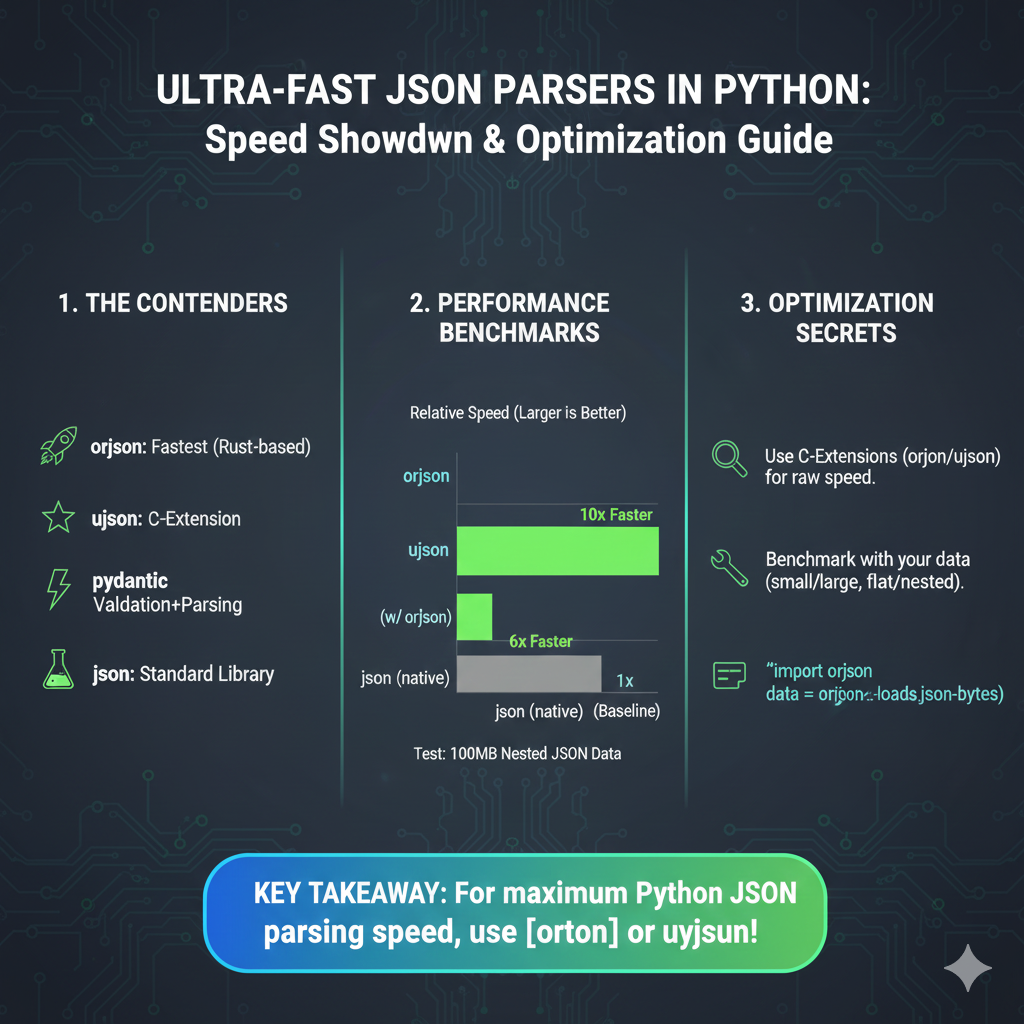
The image is an infographic titled “ULTRA-FAST JSON PARSERS IN PYTHON: Speed Showdown & Optimization Guide”. It specifically focuses on comparing and optimizing JSON parsing libraries within the Python ecosystem.
🐍 Ultra-Fast JSON Parsers in Python
The graphic is divided into three sections: The Contenders, Performance Benchmarks, and Optimization Secrets.
1. The Contenders
This section lists the popular Python libraries used for JSON parsing:
orjson: Labeled as the Fastest (Rust-based).ujson: A C-Extension.pydantic: Used for Validation + Parsing.json: The Standard Library parser.
2. Performance Benchmarks
This section provides a visual comparison of speeds, using json (native) as the baseline (1x). The test is based on 100MB of Nested JSON Data.
ujson(w/ orjson): Approximately 6x Faster than nativejson.orjson: Approximately 10x Faster than nativejson.
3. Optimization Secrets
These are key tips for achieving maximum performance:
- Use C-Extensions: Leverage libraries like
orjsonorujsonfor raw speed. - Benchmark with Your Data: Performance varies based on the JSON structure (small/large, flat/nested).
- Syntax: An example of how to load data is shown:
import orjson data = orjson.loads(json_bytes).
learn for more knowledge
Mykeywordrank-> Search Page Optimization: Maximizing Visibility and Clicks on the SERP (A Key to Your Site’s Success) – keyword rank checker
Json web token ->Spring Security JWT: Your Comprehensive Guide to JSON Web Tokens – json web token
Json Compare ->Compare Two JSON Files Online Easily and Accurately – online json comparator
Fake Json –>Dummy API for JSON Data: Unlocking Efficient Development – fake api
Leave a Reply