Introduction: Why Parse JSON in Express?
When building RESTful APIs with Express.js, clients often send data to your server in JSON format. This data, typically found in the request body, isn’t immediately accessible in a usable JavaScript object format. You need a way to parse this raw JSON string into an object that your Express application can easily work with.
This is where JSON body parsers come into play. In this guide, we’ll explore two primary methods for handling JSON request bodies in Express.js: the built-in express.json() middleware (recommended for modern Express versions) and the standalone body-parser library.
The Modern Way: Using express.json()
What is express.json()?
Since Express 4.16.0, a JSON body parser has been included directly within Express itself, eliminating the need for a separate library like body-parser for basic JSON parsing. It’s a middleware function that parses incoming request bodies with JSON payloads and makes them available under req.body.
Basic Usage of express.json()
To use express.json(), simply add it as a middleware to your application:
const express = require('express');
const app = express();
const port = 3000;

// Middleware to parse JSON bodies
app.use(express.json());

app.post('/api/data', (req, res) => {
  console.log('Received data:', req.body);
  if (req.body && Object.keys(req.body).length > 0) {
    res.status(200).json({
      message: 'Data received successfully!',
      yourData: req.body
    });
  } else {
    res.status(400).json({ message: 'No JSON data provided in the request body.' });
  }
});

app.listen(port, () => {
  console.log(`Server listening at http://localhost:${port}`);
});
In the example above, any POST request to /api/data with a Content-Type: application/json header will have its JSON body parsed and accessible via req.body.
Configuration Options for express.json()
express.json() accepts an optional options object:
limit: Controls the maximum request body size. Defaults to ‘100kb’. You can specify a string (e.g., ’50mb’) or a number of bytes.type: Specifies theContent-Typeheader that the middleware will parse. Defaults to'application/json'. You can provide a string or an array of strings.extended: This option is specific toexpress.urlencoded()and is not typically used withexpress.json().verify: A function used to verify a request.
Example with options:
app.use(express.json({
  limit: '5mb', // Accept up to 5MB JSON bodies
  type: ['application/json', 'application/vnd.api+json'] // Also parse JSON API type
}));
The Legacy/Alternative Way: Using the body-parser Middleware
What is body-parser?
Before express.json() became standard, the body-parser library was the go-to solution for parsing request bodies. It’s a Node.js middleware that handles various types of request bodies, including JSON, URL-encoded data, and raw data.
Installation
First, you need to install it:
npm install body-parser
Basic Usage of body-parser for JSON
After installation, you can use its json() method similar to express.json():
const express = require('express');
const bodyParser = require('body-parser');
const app = express();
const port = 3000;

// Middleware to parse JSON bodies using body-parser
app.use(bodyParser.json());

app.post('/api/data', (req, res) => {
  console.log('Received data:', req.body);
  if (req.body && Object.keys(req.body).length > 0) {
    res.status(200).json({
      message: 'Data received successfully!',
      yourData: req.body
    });
  } else {
    res.status(400).json({ message: 'No JSON data provided in the request body.' });
  }
});

app.listen(port, () => {
  console.log(`Server listening at http://localhost:${port}`);
});
body-parser vs. express.json()
In most modern Express applications (Express 4.16.0+), express.json() is preferred for JSON parsing because:
- It’s built into Express, reducing external dependencies.
- It offers sufficient functionality for typical JSON parsing needs.
body-parserstill has its place for parsing other body types (like XML, if you use itsraw()method creatively, or if you’re working with older Express versions).
Common Issues and Best Practices
Middleware Order Matters
Always place your body parser middleware (app.use(express.json()) or app.use(bodyParser.json())) before any route handlers that need to access req.body. If you place it after, req.body will be undefined.
Error Handling
If the client sends malformed JSON, express.json() (or body-parser.json()) will throw an error. You should have a global error-handling middleware to catch these parsing errors gracefully. For example:
app.use((err, req, res, next) => {
  if (err instanceof SyntaxError && err.status === 400 && 'body' in err) {
    return res.status(400).json({ message: 'Bad JSON format in request body' });
  }
  next();
});
Security Considerations (DoS Attacks)
Setting a reasonable limit for the body size is crucial. Without a limit, a malicious client could send an extremely large JSON payload, consuming server memory and potentially leading to a Denial of Service (DoS) attack.
Conditional Parsing
You might only want to parse JSON for specific routes. You can apply the middleware only to those routes:
app.post('/api/secure-data', express.json(), (req, res) => {
  // req.body is available only for this route
});
Conclusion
Parsing JSON request bodies is a fundamental task for any Express.js API. With express.json(), Express provides a robust and convenient built-in solution for this. For older applications or specific needs, body-parser remains a viable alternative. By understanding how to implement and configure these middlewares, along with best practices for error handling and security, you can build more resilient and user-friendly Express APIs.
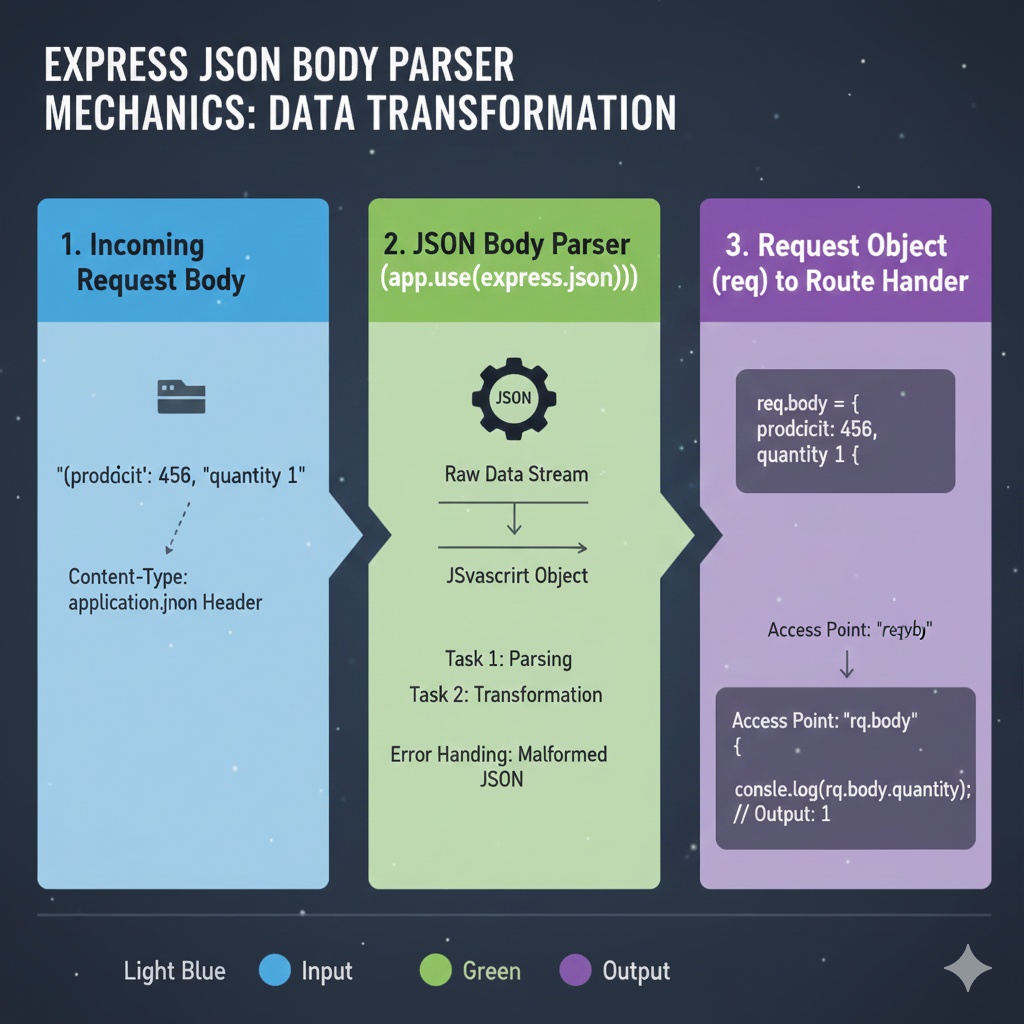
Express JSON Body Parser Mechanics: Data Transformation
1. ➡️ Input Stage: Incoming Request Body (Light Blue)
- The process begins when a client sends an HTTP request (typically
POSTorPUT). - The raw data is sent as a text string.
- The request must include the
Content-Type: application/jsonHeader so the middleware knows to process it. - Example Input:
"prodcit: 456, quantity 1"(Note: This example contains a typo but illustrates the string format).
2. 🔄 Process Stage: JSON Body Parser (app.use(express.json())) (Green)
- The request is handled by the
express.json()middleware. - This middleware converts the Raw Data Stream into a JSvascrit Object (JavaScript object).
- It performs two key Tasks: Parsing and Transformation.
- It includes Error Handling for Malformed JSON (if the string is not valid JSON).
3. ⬅️ Output Stage: Request Object (req) to Route Hander (Purple)
- The successfully transformed data is attached to the request object.
- Resulting Data:
req.body = { prodcit: 456, quantity: 1 }. - Access Point: Developers can access the data in their route handler using
req.body. - Example Access:
consle.log(req.body.quantity);which outputs the native value1.
The infographic clearly demonstrates the middleware’s essential role in deserializing the request body, making the data accessible and usable in the server’s JavaScript environment.
learn for more knowledge
Mykeywordrank-> SEO: Your Comprehensive Guide to Boosting Search Engine Optimization Rankings – keyword rank checker
Json web token ->How to Use com.auth0.jwt for Secure JWT Handling in Java – json web token
Json Compare ->JSON Comparator: The Ultimate Guide to JSON Compare Online and Offline Tools – online json comparator
Fake Json –>What Is JSON Mock API? (Beginner-Friendly Explanation) – fake api
Leave a Reply