How to Parse JSON Data Effectively: A Comprehensive Guide
In today’s interconnected web world, JSON (JavaScript Object Notation) has become the de facto standard for exchanging data between web services and applications. Whether you’re working with APIs, configuring applications, or storing data, understanding how to efficiently parse JSON is a fundamental skill for any developer. The goal is to convert the raw json string into a usable json object or data structure for your application.
What is JSON and Valid JSON Format?
JSON is a lightweight data-interchange format. It’s easy for humans to read and write and easy for machines to parse and generate. Valid JSON is built on two simple structures:
- A collection of name/value pairs (key/value pairs), which form a json object (like a dictionary).
- An ordered list of values, which form an array (like a list).
JSON Type: The core json type values include strings, numbers, booleans, null, arrays, and objects.
Here’s an example of a simple JSON structure:
JSON
{
  "name": "John Doe",
  "age": 30,
  "isStudent": false,
  "courses": ["History", "Math", "Science"]
}
Why is Parsing JSON Important?
When you receive JSON data (often called a response JSON) from an API or a file, it’s typically in a single, continuous json string format. To access and manipulate the data within your application, you need to convert this string into a native data structure that your programming language (javascript, Python, PHP) can understand. This process is known as JSON parsing.
How to Parse JSON in Different Programming Languages
Parsing JSON in JavaScript
JavaScript has built-in json functions to handle JSON parsing. The primary method is JSON.parse().
JavaScript
const jsonString = '{ "name": "Alice", "age": 25, "city": "New York" }';
try {
  const data = JSON.parse(jsonString); // Converts json string to javascript object
  console.log(data.name);
} catch (error) {
  console.error("Failed to parse JSON:", error);
}
Parsing JSON in Python
Python provides the built-in json module. You’ll primarily use json.loads() to parse a json string into a Python dictionary or list.
Python
import json

json_string = '{ "product": "Laptop", "price": 1200 }'
try:
  data = json.loads(json_string)
  print(data["product"])
except json.JSONDecodeError as e:
  print(f"Failed to parse JSON: {e}")
Advanced JSON Querying and Editing Tools
For developers working with complex JSON data structures or needing to modify JSON on the fly, specialized tools and languages are essential.
Using JSONata for Data Query and Transformation
JSONata is a lightweight query and transformation language for JSON data. It allows developers to express sophisticated queries in a compact notation to select, query, and restructure data. This is highly useful when you need to transform a complex response JSON into a simple data json document or object needed by your server.
- Query: Extract specific values from nested json objects or arrays.
- Example:
products[price > 100].name
- Example:
- Transform: Create a completely new json document structure from the input data.
- Functions: Built-in json functions for string manipulation, aggregation, and conditional logic.
JSON Editor Online Tools for Modification
Before parsing, it’s often necessary to check if the json string is valid json. Online editor tools are perfect for this.
- JSON Editor Online: These web-based editor online platforms allow you to quickly paste, format, validate, and modify json documents in a visual tree view.
- JSON Validation: A good json editor will instantly flag if your $\text{JSON}$ is not valid json (e.g., a missing comma or incorrect type).
Tip: Use an online json editor to quickly debug JSON before attempting to parse it in your javascript or other application.
Best Practices for JSON Parsing
- Error Handling: Always wrap your parsing logic in error handling blocks (
try...catchorjson.JSONDecodeError) to gracefully manage malformed or invalid JSON. - Schema Validation: For complex applications, use JSON Schema to validate the structure and data types of your incoming JSON.
- Performance: For very large json documents, consider streaming parsers to avoid loading the entire file into memory at once.
- Security: Only parse JSON from trusted sources.
Conclusion
Mastering JSON data parsing is an essential skill for modern web development. By understanding the built-in json functions in languages like javascript and utilizing advanced tools like JSONata and a json editor online to modify json and ensure valid json type, you can effectively integrate and manipulate data in your applications, ensuring robust and reliable performance. Start experimenting with these techniques to streamline your data handling processes today!
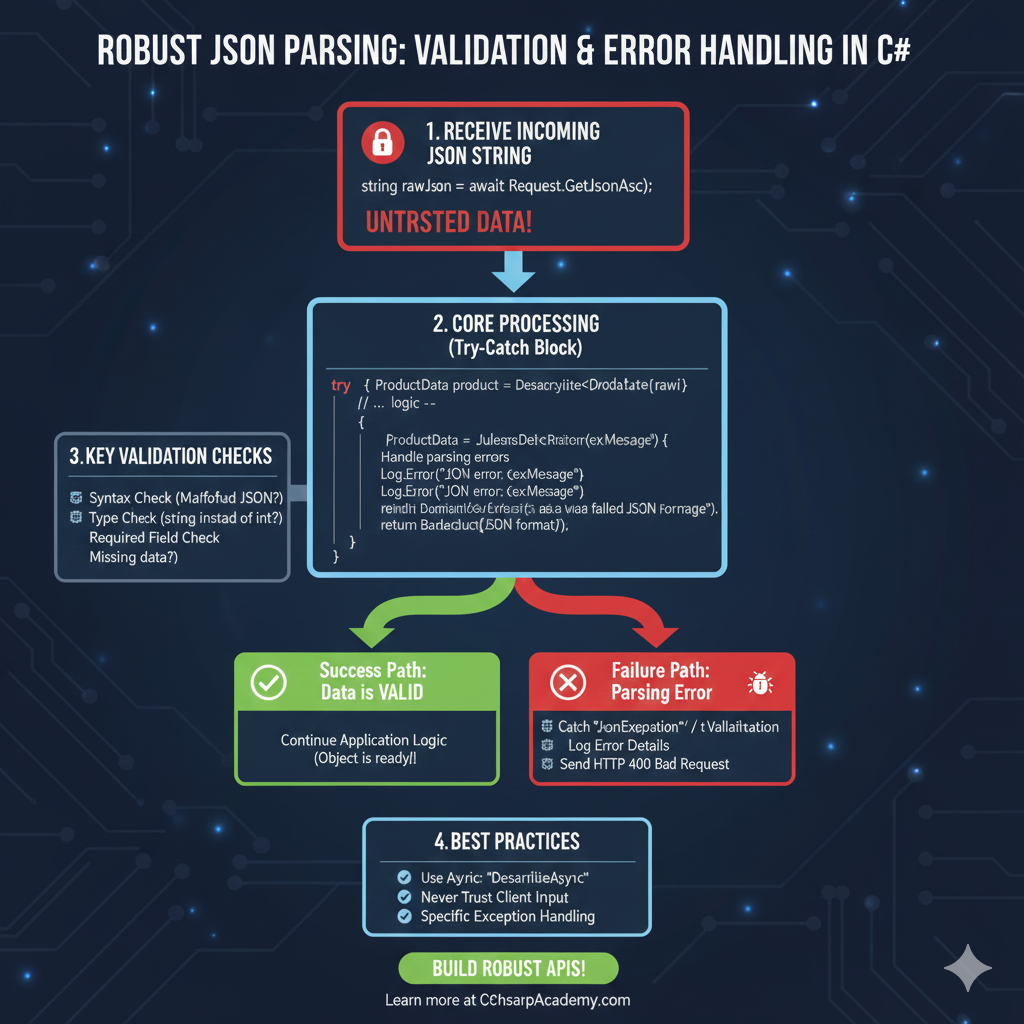
JSON Parsing: Validation & Error Handling
This infographic visualizes the process developers must follow to safely consume and parse JSON data, prioritizing validation and robust error handling in C#.
1. Receive Incoming JSON String 📥
The process starts with receiving external data that should be treated as potentially flawed.
- Action: Receive raw JSON (e.g.,
string rawJson = await Request.GetJsonAsc();). - Warning: This data is labeled UNTRSTED DATA!.
2. Core Processing (Try-Catch Block) 🛡️
The application attempts to parse the data inside a protective block to handle expected errors gracefully.
- Code Structure: Uses a
try { ... } catch (JsonException) { ... }block. - Success Path (Green):
- Condition: Data is VALID.
- Action: Continue Application Logic (Object is ready!).
- Failure Path (Red):
- Condition: Parsing Error occurs (e.g., invalid JSON format).
- Action 1: Catch “JornExpeption” (
JsonException/ Validation Error). - Action 2: Log Error Details (Record the issue).
- Action 3: Send HTTP 400 Bad Request (Return an error to the client).
3. Key Validation Checks 🛑
These are the primary reasons why JSON parsing typically fails.
- Syntax Check: Malformed JSON?
- Type Check: String instead of int? (Type mismatch)
- Required Field Check: Missing data?
4. Best Practices ✨
Tips for building robust API endpoints that handle JSON input reliably.
- Use Async: Use
DeserlizeAsync. - Client Input: Never Trust Client Input.
- Exceptions: Use Specific Exception Handling.
learn for more knowledge
Mykeywordrank->Google Website Rank Checker- Track Your Keyword Rank and SEO Performance – keyword rank checker
Json web token ->What Is OneSpan Token – json web token
Json Compare ->What Is JSON Diff Online? (Beginner-Friendly Explanation) – online json comparator
Fake Json –>Fake JSON API: Using JSONPlaceholder, DummyJSON, and Mock API – fake api
Leave a Reply