JSON (JavaScript Object Notation) is a lightweight data-interchange format widely used in web applications, APIs, and configuration files. As a Go developer, understanding how to efficiently parse JSON is fundamental. Go’s standard library provides the powerful encoding/json package, making it straightforward to work with JSON data.
This tutorial will guide you through the process of parsing JSON in Golang, from basic unmarshaling to handling more complex structures and error scenarios, helping you boost your backend development skills and improve your application’s data handling.
Basic JSON Parsing in Go
The most common way to parse JSON in Go is to unmarshal it into a Go struct. This method leverages Go’s strong typing and provides clear structure to your data.
Example: Simple JSON to Struct
Let’s start with a basic JSON object and unmarshal it into a Go struct.
{
  "name": "Alice",
  "age": 30,
  "isStudent": false
}
First, define a Go struct that matches the structure of your JSON data.
type Person struct {
    Name      string `json:"name"`
    Age       int    `json:"age"`
    IsStudent bool   `json:"isStudent"`
}
Now, let’s write the code to parse this JSON string:
package main

import (
    "encoding/json"
    "fmt"
)

type Person struct {
    Name      string `json:"name"`
    Age       int    `json:"age"`
    IsStudent bool   `json:"isStudent"`
}

func main() {
    jsonString := `{
        "name": "Alice",
        "age": 30,
        "isStudent": false
    }`

    var p Person
    err := json.Unmarshal([]byte(jsonString), &p)
    if err != nil {
        fmt.Println("Error unmarshaling JSON:", err)
        return
    }

    fmt.Printf("Parsed Person: %+v\n", p)
    fmt.Printf("Name: %s, Age: %d, IsStudent: %t\n", p.Name, p.Age, p.IsStudent)
}
In this example, json.Unmarshal takes a byte slice of the JSON data and a pointer to the Go struct where the data should be stored. The `json:"field_name"` tags are crucial; they map JSON keys to struct fields. If a JSON key doesn’t have a corresponding tag or field in the struct, it will be ignored during unmarshaling.
Handling Slices/Arrays of JSON Objects
What if you have an array of JSON objects?
[
  {
    "name": "Alice",
    "age": 30
  },
  {
    "name": "Bob",
    "age": 24
  }
]
You can unmarshal this into a slice of your Go struct:
package main

import (
    "encoding/json"
    "fmt"
)

type Person struct {
    Name string `json:"name"`
    Age  int    `json:"age"`
}

func main() {
    jsonString := `[
        {"name": "Alice", "age": 30},
        {"name": "Bob", "age": 24}
    ]`

    var people []Person
    err := json.Unmarshal([]byte(jsonString), &people)
    if err != nil {
        fmt.Println("Error unmarshaling JSON:", err)
        return
    }

    fmt.Println("Parsed People:")
    for _, p := range people {
        fmt.Printf("  Name: %s, Age: %d\n", p.Name, p.Age)
    }
}
The process is similar; instead of a single struct, we declare a slice of structs ([]Person) to hold the parsed data.
Advanced Parsing Techniques
Custom Field Names with Tags
Sometimes, your Go struct field names might not directly match your JSON keys (e.g., using PascalCase in Go for a snake_case JSON key). JSON struct tags come to the rescue.
{
  "first_name": "Charlie",
  "last_name": "Brown"
}
You can map these to Go fields like FirstName and LastName:
type User struct {
    FirstName string `json:"first_name"`
    LastName  string `json:"last_name"`
}
The tag `json:"first_name"` tells the encoding/json package to map the JSON key "first_name" to the FirstName field of the User struct.
package main

import (
    "encoding/json"
    "fmt"
)

type User struct {
    FirstName string `json:"first_name"`
    LastName  string `json:"last_name"`
}

func main() {
    jsonString := `{
        "first_name": "Charlie",
        "last_name": "Brown"
    }`

    var user User
    err := json.Unmarshal([]byte(jsonString), &user)
    if err != nil {
        fmt.Println("Error unmarshaling JSON:", err)
        return
    }

    fmt.Printf("Parsed User: %s %s\n", user.FirstName, user.LastName)
}
Tags can also specify behavior like "omitempty" (omit field if empty) or "-" (ignore field).
Handling Nested JSON
JSON often contains nested objects. Go handles this by using nested structs.
{
  "company_name": "Tech Solutions",
  "location": {
    "city": "New York",
    "country": "USA"
  },
  "employees": [
    {"name": "Dave", "id": "E001"},
    {"name": "Eve", "id": "E002"}
  ]
}
You’d define corresponding nested structs:
type Location struct {
    City    string `json:"city"`
    Country string `json:"country"`
}

type Employee struct {
    Name string `json:"name"`
    ID   string `json:"id"`
}

type Company struct {
    CompanyName string     `json:"company_name"`
    Location    Location   `json:"location"`
    Employees   []Employee `json:"employees"`
}
And then unmarshal into the top-level struct Company:
package main

import (
    "encoding/json"
    "fmt"
)

type Location struct {
    City    string `json:"city"`
    Country string `json:"country"`
}

type Employee struct {
    Name string `json:"name"`
    ID   string `json:"id"`
}

type Company struct {
    CompanyName string     `json:"company_name"`
    Location    Location   `json:"location"`
    Employees   []Employee `json:"employees"`
}

func main() {
    jsonString := `{
        "company_name": "Tech Solutions",
        "location": {
            "city": "New York",
            "country": "USA"
        },
        "employees": [
            {"name": "Dave", "id": "E001"},
            {"name": "Eve", "id": "E002"}
        ]
    }`

    var company Company
    err := json.Unmarshal([]byte(jsonString), &company)
    if err != nil {
        fmt.Println("Error unmarshaling JSON:", err)
        return
    }

    fmt.Printf("Company: %s\n", company.CompanyName)
    fmt.Printf("Location: %s, %s\n", company.Location.City, company.Location.Country)
    fmt.Println("Employees:")
    for _, emp := range company.Employees {
        fmt.Printf("  - Name: %s, ID: %s\n", emp.Name, emp.ID)
    }
}
This approach allows for clear and type-safe access to your nested data.
Unmarshaling into map[string]interface{}
Sometimes, the structure of your JSON is dynamic or not fully known beforehand. In such cases, you can unmarshal JSON into a map[string]interface{}.
This approach gives you flexibility but sacrifices type safety, requiring type assertions to access values.
package main

import (
    "encoding/json"
    "fmt"
)

func main() {
    jsonString := `{
        "product_id": "P123",
        "details": {
            "price": 99.99,
            "currency": "USD",
            "available": true
        },
        "tags": ["electronics", "gadget"]
    }`

    var data map[string]interface{}
    err := json.Unmarshal([]byte(jsonString), &data)
    if err != nil {
        fmt.Println("Error unmarshaling JSON:", err)
        return
    }

    fmt.Println("Parsed Data (map):")
    for key, value := range data {
        fmt.Printf("  %s: %v (%T)\n", key, value, value)
    }

    // Accessing values with type assertions
    if productID, ok := data["product_id"].(string); ok {
        fmt.Println("Product ID (asserted):", productID)
    }

    if details, ok := data["details"].(map[string]interface{}); ok {
        if price, ok := details["price"].(float64); ok {
            fmt.Println("Price (asserted):", price)
        }
    }
}
Use map[string]interface{} when you need to inspect arbitrary JSON or when the schema isn’t fixed, but prefer structs for well-defined data structures for better readability and maintainability.
Error Handling in JSON Parsing
Robust error handling is crucial when dealing with external data. The json.Unmarshal function returns an error if something goes wrong (e.g., malformed JSON, type mismatch). Always check for errors.
package main

import (
    "encoding/json"
    "fmt"
)

type Item struct {
    Name  string `json:"name"`
    Price float64 `json:"price"`
}

func main() {
    // Malformed JSON: 'price' is a string, but struct expects float64
    malformedJson := `{
        "name": "Laptop",
        "price": "not_a_number"
    }`

    var item Item
    err := json.Unmarshal([]byte(malformedJson), &item)
    if err != nil {
        fmt.Println("Error unmarshaling malformed JSON:", err) // This will print an error
    } else {
        fmt.Printf("Parsed Item: %+v\n", item)
    }

    // Correct JSON
    correctJson := `{
        "name": "Laptop",
        "price": 1200.50
    }`

    err = json.Unmarshal([]byte(correctJson), &item)
    if err != nil {
        fmt.Println("Error unmarshaling correct JSON:", err)
    } else {
        fmt.Printf("Parsed Item: %+v\n", item)
    }
}
The error message often provides valuable information about what went wrong, helping you debug issues quickly.
Conclusion
Parsing JSON in Go is a powerful feature enabled by the encoding/json package. Whether you’re working with simple flat structures or complex nested data, Go provides flexible and type-safe ways to handle your JSON. By mastering structs, tags, and error handling, you can efficiently integrate JSON data into your Golang applications, enhancing their functionality and reliability.
Remember to always define structs that closely match your expected JSON schema for the best balance of safety and ease of use. For dynamic or unknown structures, map[string]interface{} offers a flexible alternative.
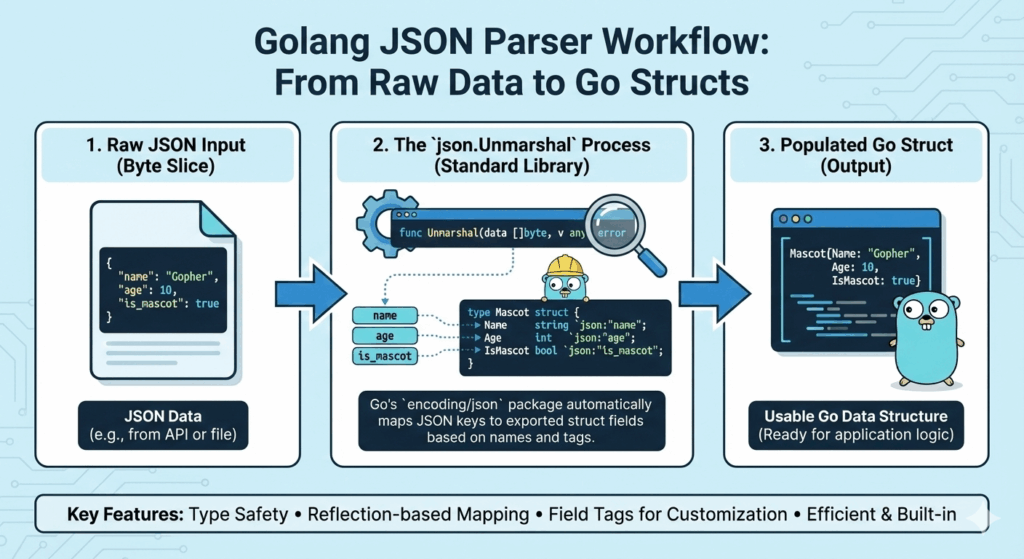
The infographic titled “Golang JSON Parser Workflow: From Raw Data to Go Structs” illustrates how the Go programming language handles the conversion of JSON data into native data structures.
🐹 Golang JSON Parser Workflow
This infographic breaks down the parsing process into three fundamental stages:
1. Raw JSON Input (Byte Slice)
- Data Source: The process begins with raw JSON data, which might be received as a response from an API or read from a local file.
- Format: In Go, this data is typically handled as a byte slice (
[]byte).
2. The json.Unmarshal Process
- Standard Library: Go utilizes the built-in
encoding/jsonpackage for parsing. - Core Function: The
func Unmarshal(data []byte, v any) errorfunction is the engine of this process. - Mapping Logic: The package automatically maps JSON keys to exported fields in a defined Go struct.
- Field Tags: Developers use specific tags (e.g.,
`json:"name"`) within the struct definition to precisely control how JSON keys correspond to struct fields.
3. Populated Go Struct (Output)
- Final Result: The output is a usable Go data structure that is fully populated with the data from the original JSON.
- Application Ready: Once the data is in a struct, it is ready to be used within the application’s core logic.
🚀 Key Features of Go’s JSON Parser
- Type Safety: Ensures that the data conforms to the expected types defined in your structs.
- Reflection-based Mapping: Dynamically connects JSON keys to struct fields at runtime.
- Field Tags for Customization: Allows for flexible naming conventions between JSON and Go code.
- Efficient & Built-in: Part of the Go standard library, requiring no external dependencies for high-performance parsing.
learn for more knowledge
Mykeywordrank-> Keyword SEO-Master Keyword Research and Discover the Best SEO Keywords with a Free Keyword Tool – keyword rank checker
Json web token ->How to Securely Implement and Validate JWTs in AWS – json web token
Json Compare ->How to Compare Two JSONs Online: Your Ultimate Guide – online json comparator
Fake Json –>How to Create Dummy API Responses for Seamless Development and Testing – fake api
Leave a Reply