Introduction to java json and the json parser
JSON (JavaScript Object Notation) has become the de facto standard for data interchange on the web, widely used in APIs, json files, and configuration. As a java developer, knowing how to efficiently parse and manipulate json data using a library is a crucial skill. This guide provides a java json parser example for the most popular frameworks, helping you choose the right method for your maven project.
java json parser example: Top Libraries Compared
The java ecosystem offers several robust libraries for processing json. We’ll focus on the big three: Jackson, Gson, and Jakarta EE’s standard object model.
1. Jackson: The Industry Standard json parser
Jackson is known for its high-performance jackson databind module. It is the most common java json tool used in enterprise environments.
Maven Dependency for Jackson
To get started, add this dependency to your maven pom.xml:
XML
<dependency>
    <groupId>com.fasterxml.jackson.core</groupId>
    <artifactId>jackson-databind</artifactId>
    <version>2.15.2</version>
</dependency>
Jackson Data Binding Example
Using the jackson databind library, you can convert a string or object into a POJO effortlessly:
Java
import com.fasterxml.jackson.databind.ObjectMapper;

public class JacksonExample {
    public static void main(String[] args) {
        ObjectMapper mapper = new ObjectMapper(); // Core object for jackson
        String jsonString = "{\"name\":\"John\",\"age\":30}";

        try {
            User user = mapper.readValue(jsonString, User.class);
            System.out.println("Parsed: " + user.getName());
        } catch (Exception e) { e.printStackTrace(); }
    }
}
2. jsonparser parse: High-Performance Streaming
If you are dealing with massive json data and need to minimize memory, you might use the low-level jsonparser to parse the data incrementally. This method involves tracking parsing states like START_OBJECT or FIELD_NAME.
java json parser example (Streaming)
Instead of loading the whole object into memory, you can use a filereader reader to process json files line-by-line:
Java
import com.fasterxml.jackson.core.JsonFactory;
import com.fasterxml.jackson.core.JsonParser;
import com.fasterxml.jackson.core.JsonToken;

// Using jsonparser to parse token by token
JsonFactory factory = new JsonFactory();
try (JsonParser jsonParser = factory.createParser(new StringReader(jsonString))) {
    while (jsonParser.nextToken() != JsonToken.END_OBJECT) {
        // Handle parsing states here
    }
}
3. Gson: Simplicity from Google
Gson is a lightweight java json library that excels at simplicity. It is often the preferred parser for Android development or smaller java utilities.
- Pros: Easy to import, no mandatory annotations.
- Cons: Slower than Jackson for huge json data sets.
4. Jakarta JSON-P: The Standard Object Model
JSON-P (formerly import javax.json) provides a standard API for creating an object jsonobject. It is vendor-neutral and built into many Jakarta EE application servers.
object jsonobject Example
Java
import jakarta.json.Json;
import jakarta.json.JsonObject; // Using the object jsonobject class
import jakarta.json.JsonReader;

try (JsonReader reader = Json.createReader(new StringReader(jsonData))) {
    JsonObject jsonObject = reader.readObject();
    System.out.println(jsonObject.getString("name"));
}
Best Practices for java json Processing
| Feature | Jackson | Gson | Jakarta (JSON-P) |
| Primary Use | Enterprise APIs | Simple Projects | EE Standards |
| Performance | Highest | Medium | Medium |
| Approach | jackson databind | Simple Mapping | object model |
| Dependency | Multiple maven artifacts | Single dependency | Jakarta API |
- Error Handling: Always validate your json data before you parse to avoid
JsonParseException. - Type Safety: Map your json to a Java object (POJO) rather than working with raw string data.
- File Handling: When reading from json files, always wrap your filereader reader in a try-with-resources block to prevent memory leaks.
Conclusion
Mastering the java json parser example is a foundational skill. Whether you choose the power of Jackson, the simplicity of Gson, or the standard Jakarta object model, your ability to handle json data will make your java applications more robust. Remember to always include the correct maven dependency and choose the parser that fits your project’s scale.
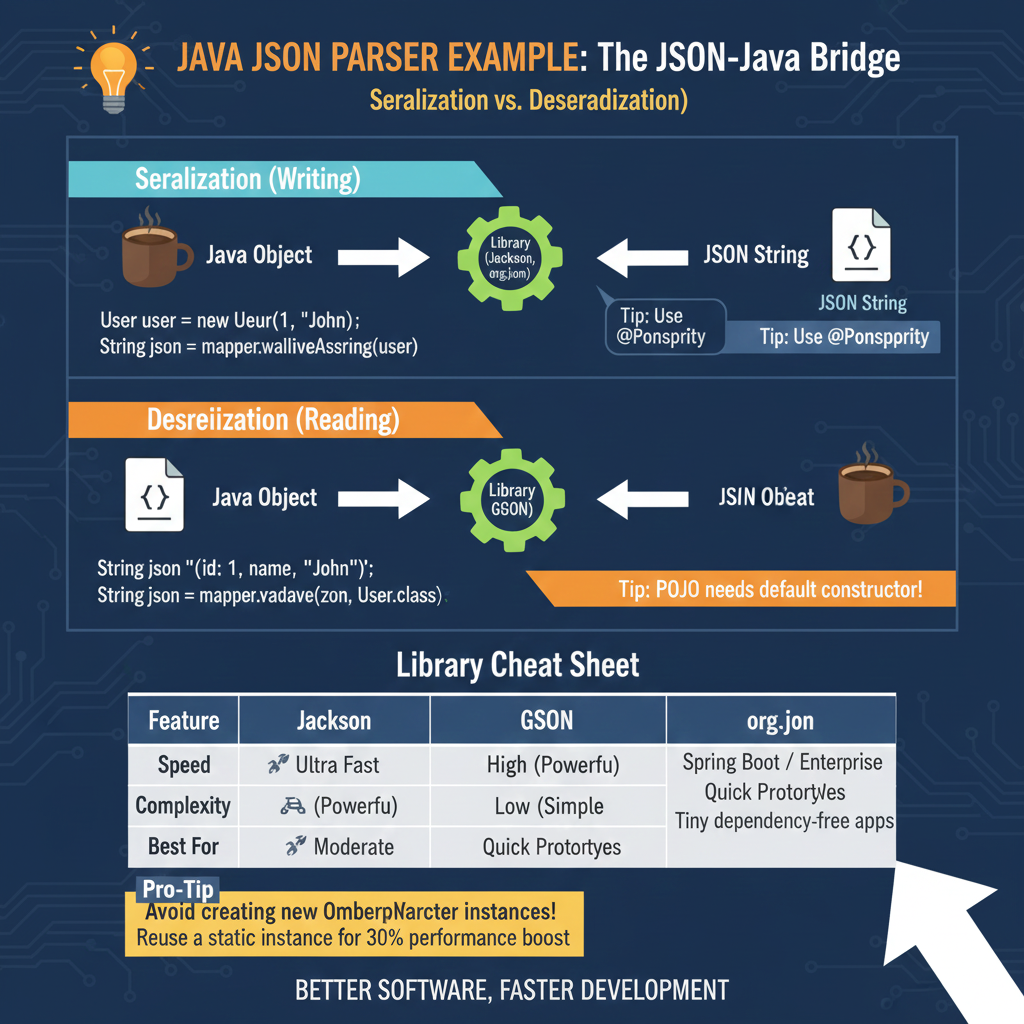
The Serialization & Deserialization Workflow
The infographic breaks down the two-way communication process essential for modern web development:
1. Serialization (Writing)
This process converts live Java data into a format that can be stored or transmitted:
- The Transformation: A Java Object is passed through a library (like Jackson or GSON) to become a JSON String.
- Code Implementation: Uses methods like
mapper.writeValueAsString(user)to generate the text output. - Pro Tip: Use annotations like
@JsonPropertyto map Java field names to specific JSON keys.
2. Deserialization (Reading)
This process reconstructs Java objects from incoming JSON data:
- The Transformation: A raw JSON String is parsed back into a structured Java Object.
- Code Implementation: Uses methods like
mapper.readValue(json, User.class)to populate the object fields. - Critical Requirement: Your POJO (Plain Old Java Object) must have a default constructor for the parser to instantiate it correctly.
📊 Library Cheat Sheet
The infographic provides a quick comparison to help developers choose the right tool for their project:
| Feature | Jackson | GSON | org.json |
| Speed | 🚀 Ultra Fast | 🏎️ High (Powerful) | 🚲 Moderate |
| Complexity | High (Powerful) | Low (Simple) | Minimal |
| Best For | Spring Boot / Enterprise | Quick Prototypes | Tiny, dependency-free apps |
💡 PERFORMANCE PRO-TIP: Avoid creating new ObjectMapper instances repeatedly; reuse a static instance to gain a 30% performance boost.
learn for more knowledge
Mykeywordrank->small seo tool for keyword rank checking and local rank checker – keyword rank checker
json web token-> python jwt: How to Securely Implement jwt in python – json web token
Json Compare ->How to Effectively Use a JSON Comparator Online: Your Ultimate Guide to JSON Compare, and JSON Diff – online json comparator
Fake Json –>How to Generate and Use Dummy JSON Data for Development and Testing – fake api
Leave a Reply