Understanding JSON and Why Parsing is Essential
JSON (JavaScript Object Notation) has become the de facto standard for data interchange on the web. It’s a lightweight, human-readable format that’s easy for machines to parse and generate. Whether you’re fetching data from an API, sending data to a server, or storing configuration settings, you’ll inevitably encounter JSON.
While JSON looks similar to JavaScript objects, it’s actually a string. To work with JSON data in your JavaScript applications – to access its properties, modify values, or iterate over arrays – you first need to convert this JSON string into a native JavaScript object. This process is known as “parsing.”
How to Parse JSON in JavaScript Using JSON.parse()
JavaScript provides a built-in global object called JSON, which has a static method specifically designed for this task: JSON.parse().
Basic Usage
The JSON.parse() method takes a JSON string as an argument and returns the corresponding JavaScript object.
const jsonString = '{"name": "Alice", "age": 30, "city": "New York"}';
const jsObject = JSON.parse(jsonString);

console.log(jsObject.name); // Output: Alice
console.log(jsObject.age);  // Output: 30
It’s straightforward and efficient for valid JSON strings.
Handling Malformed JSON and Errors
One of the most crucial aspects of parsing JSON, especially when dealing with external data, is error handling. If the string you provide to JSON.parse() is not a valid JSON format, it will throw a SyntaxError. It’s good practice to wrap your parsing logic in a try...catch block to gracefully handle such situations.
const malformedJsonString = '{name: "Bob", "age": 25}'; // Missing quotes around 'name'

try {
  const parsedObject = JSON.parse(malformedJsonString);
  console.log(parsedObject);
} catch (error) {
  console.error("Error parsing JSON:", error.message);
  // Output: Error parsing JSON: Expected property name or '}' in JSON at position 1
}
This allows your application to continue running even if it receives invalid data, providing a better user experience or logging the issue for debugging.
Using the Reviver Function (Optional but Powerful)
JSON.parse() also accepts an optional second argument: a “reviver” function. This function is called for each member of the object and allows you to transform values before they are returned. It’s particularly useful for converting string representations of dates back into actual Date objects, for example.
const jsonWithDate = '{"event": "Meeting", "date": "2023-10-27T10:00:00.000Z"}';

const parsedWithReviver = JSON.parse(jsonWithDate, (key, value) => {
  if (key === 'date' && typeof value === 'string' && value.match(/^\d{4}-\d{2}-\d{2}T\d{2}:\d{2}:\d{2}.\d{3}Z$/)) {
    return new Date(value);
  }
  return value;
});

console.log(parsedWithReviver.date); // Output: Fri Oct 27 2023 ... (Date object)
console.log(typeof parsedWithReviver.date); // Output: object
Online JSON Parsing Tools: When and Why to Use Them
While JavaScript’s built-in JSON.parse() is your primary tool for programmatic parsing, online JSON parsing tools can be incredibly helpful during development, debugging, or when you need to quickly inspect or validate a JSON string without writing code.
- Validation: Many online tools can tell you if your JSON is syntactically correct and highlight any errors.
- Formatting/Prettifying: They can format unreadable, minified JSON into a well-indented, human-friendly structure.
- Tree View: Some offer an interactive tree view, allowing you to easily navigate through complex JSON structures.
- Conversion: A few tools can even convert JSON to other formats like XML or YAML.
Simply search for “javascript json parse online” or “online JSON parser” to find numerous free tools available. These are excellent for quick checks before integrating data into your application.
Conclusion
Mastering JSON parsing in JavaScript is a fundamental skill for any web developer. By leveraging the JSON.parse() method, understanding how to handle potential errors, and knowing when to use online tools, you can efficiently work with JSON data in your applications. Remember to always validate your JSON inputs and implement robust error handling for a seamless user experience.
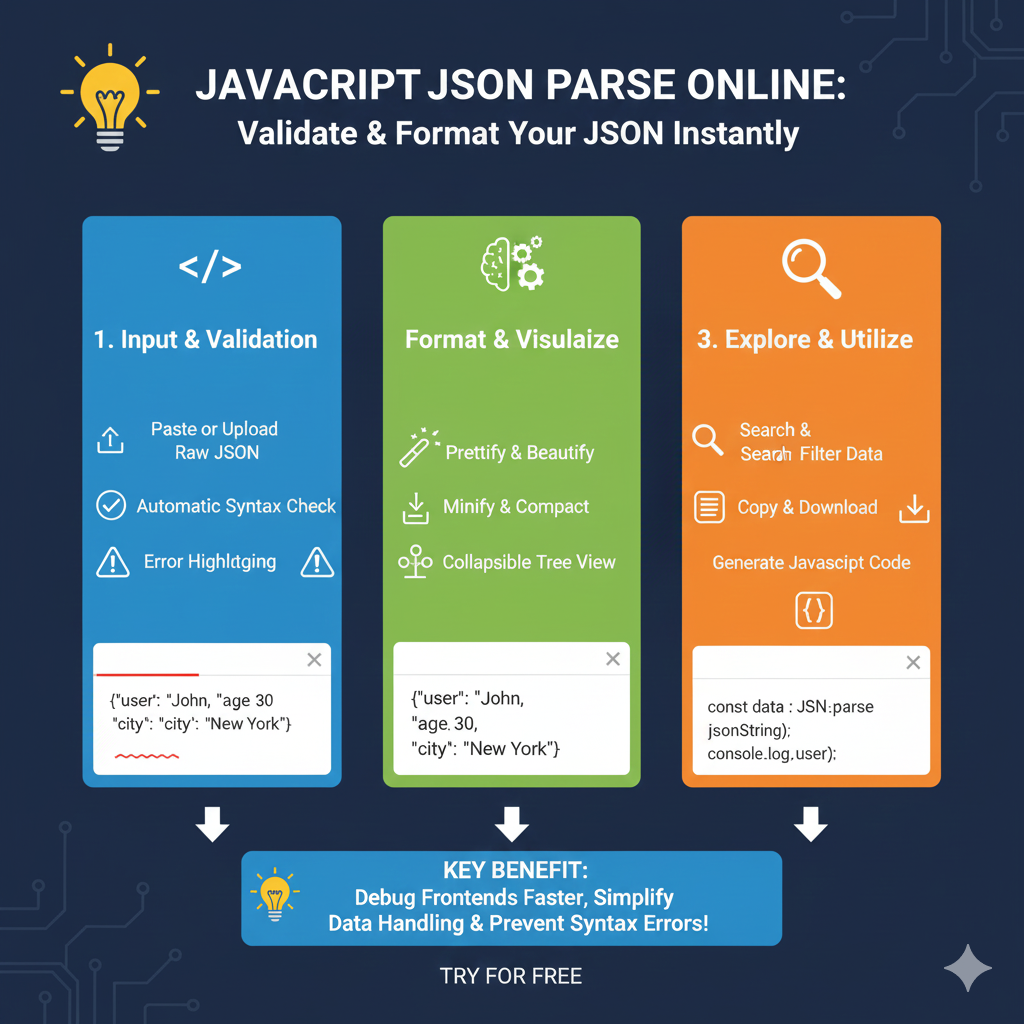
The infographic titled “JAVASCRIPT JSON PARSE ONLINE: Validate & Format Your JSON Instantly” provides a comprehensive guide to using online tools for managing and debugging JSON data in web development.
🛠️ JavaScript JSON Parsing Workflow
The process is divided into three key stages that help developers transform raw data into usable code:
1. Input & Validation (Blue)
This stage focuses on ensuring the data is clean and syntactically correct:
- Data Entry: Users can Paste or Upload raw JSON strings directly into the editor.
- Real-time Checks: The tool performs an Automatic Syntax Check to identify common errors like missing commas or mismatched brackets.
- Error Highlighting: Any structural issues are visually flagged with Error Highlighting, allowing for immediate corrections.
2. Format & Visualize (Green)
Once validated, the data is transformed for better readability and structure:
- Clean Layout: Use the Prettify & Beautify feature to indent and organize minified data for human review.
- Size Optimization: Alternatively, the Minify & Compact option removes all whitespace to reduce file size for production use.
- Hierarchical View: A Collapsible Tree View allows users to expand or hide nested objects and arrays, making large datasets easier to navigate.
3. Explore & Utilize (Orange)
The final stage focuses on extracting insights and integrating the data into your project:
- Data Search: A Search & Filter function helps you find specific keys or values within massive JSON files.
- Output Options: Users can Copy & Download the formatted data for local use.
- Code Generation: The tool automatically Generates JavaScript Code, providing snippets like
const data = JSON.parse(jsonString);to save manual typing time.
learn for more knowledge
Mykeywordrank-> small seo tool for keyword rank checking and local rank checker – keyword rank checker
json web token-> python jwt: How to Securely Implement jwt in python – json web token
Json Compare ->How to Effectively Use a JSON Comparator Online: Your Ultimate Guide to JSON Compare, and JSON Diff – online json comparator
Fake Json –>How to Generate and Use Dummy JSON Data for Development and Testing – fake api
Leave a Reply