Introduction to JSON Body Parsing in Express.js
When building web APIs with Node.js and Express.js, handling incoming data from client requests is a fundamental task. Often, this data is sent in JSON format, especially for RESTful APIs. To access this JSON data within your Express routes, you need a mechanism to parse the request body. This is where body-parser JSON comes into play.
This guide will show you how to parse JSON request bodies using the popular body-parser middleware or Express’s built-in solution, making it easy to work with client-side JSON data.
What is Body-Parser?
body-parser is a Node.js middleware specifically designed to parse incoming request bodies. It handles various data formats, including JSON, URL-encoded forms, and raw buffers. While it was once a standalone package essential for Express apps, modern versions of Express (4.16.0+) include their own built-in body-parsing middleware, making the separate body-parser package optional for JSON and URL-encoded data.
Why do you need to parse JSON?
By default, the req.body object in Express is undefined. This is because Express applications do not automatically know how to interpret the raw stream of data sent in an HTTP request body. A parser is needed to take this raw data, identify its format (e.g., JSON), and transform it into a usable JavaScript object attached to req.body.
How to Parse JSON with Express’s Built-in Middleware
For most modern Express applications, you don’t need to install body-parser separately for JSON parsing. Express itself provides the functionality. Here’s how to use it:
Step 1: Set up your Express application
const express = require('express');
const app = express();
const port = 3000;
Step 2: Use the built-in JSON parser middleware
Add the following line early in your middleware stack to enable JSON body parsing:
app.use(express.json());This middleware parses incoming requests with JSON payloads and makes the data available on the req.body property.
Step 3: Create a route to handle POST requests
Now, you can define a route that accepts POST requests and accesses the parsed JSON data:
app.post('/api/data', (req, res) => {
  console.log('Received data:', req.body);
  const { name, email } = req.body; // Destructure properties from the parsed JSON

  if (!name || !email) {
    return res.status(400).send('Name and email are required.');
  }
  res.status(200).json({ message: 'Data received successfully!', yourData: { name, email } });
});

app.listen(port, () => {
  console.log(`Server listening at http://localhost:${port}`);
});
Full Example Code (Express Built-in)
const express = require('express');
const app = express();
const port = 3000;

// Middleware to parse JSON bodies
app.use(express.json());

app.get('/', (req, res) => {
  res.send('Welcome to the JSON Body Parser Example!');
});

app.post('/api/users', (req, res) => {
  const userData = req.body; // Parsed JSON data is here
  console.log('New user data:', userData);

  // Example validation
  if (!userData.username || !userData.email) {
    return res.status(400).json({ error: 'Username and email are required.' });
  }

  // In a real app, you would save userData to a database
  res.status(201).json({ message: 'User created successfully', user: userData });
});

app.listen(port, () => {
  console.log(`Server running on http://localhost:${port}`);
});
How to Test with cURL
To test the above endpoint, you can use a tool like cURL or Postman. Here’s a cURL command:
curl -X POST -H "Content-Type: application/json" -d '{"username": "johndoe", "email": "john.doe@example.com"}' http://localhost:3000/api/usersYou should see a response similar to:
{"message":"User created successfully","user":{"username":"johndoe","email":"john.doe@example.com"}}Using the Standalone Body-Parser Package (Legacy/Specific Needs)
If you are working with an older Express version or have specific needs that the standalone body-parser package addresses better (e.g., parsing raw buffers or text bodies not handled by express.json()), you can still use it. The process is very similar.
Step 1: Install body-parser
npm install body-parserStep 2: Require and use body-parser
const express = require('express');
const bodyParser = require('body-parser');
const app = express();
const port = 3000;

// Use body-parser middleware to parse JSON request bodies
app.use(bodyParser.json());

app.post('/api/products', (req, res) => {
  const productData = req.body;
  console.log('New product data:', productData);
  res.status(201).json({ message: 'Product added successfully', product: productData });
});

app.listen(port, () => {
  console.log(`Server running on http://localhost:${port}`);
});
Important Considerations for Body-Parser JSON
- Middleware Order: Always place your body-parsing middleware (
app.use(express.json())orapp.use(bodyParser.json())) before any routes that need to accessreq.body. If placed after,req.bodywill remainundefinedfor those routes. - Content-Type Header: The client sending the request MUST include the
Content-Type: application/jsonheader. Without this, the middleware won’t know to parse the body as JSON. - Body Size Limit: Both
express.json()andbodyParser.json()have a default limit for the size of the request body (often around 100kb). You can configure this limit:- For
express.json():app.use(express.json({ limit: '10mb' })); - For
bodyParser.json():app.use(bodyParser.json({ limit: '10mb' }));
- For
- Error Handling: If the client sends malformed JSON, the parser will throw an error. It’s good practice to implement error handling middleware to gracefully manage such situations.
Conclusion
Parsing JSON request bodies is a critical aspect of building robust APIs with Express.js. Whether you opt for Express’s built-in express.json() middleware or the standalone body-parser package, the process is straightforward. By properly configuring your application, you can easily access and manipulate client-sent JSON data, empowering your Node.js backend.
Remember to always consider the Content-Type header and the order of your middleware for optimal performance and correct functionality when dealing with body parser JSON.
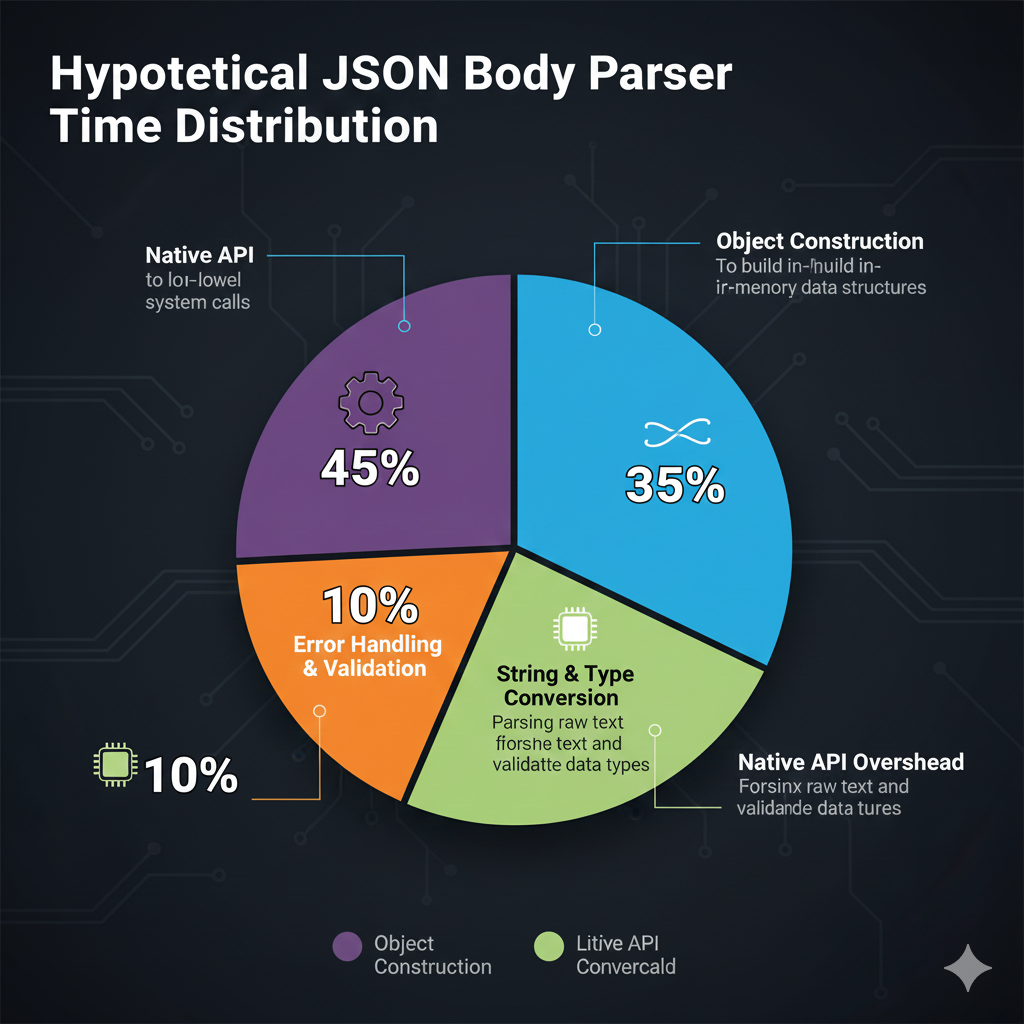
JSON Body Parser Time Distribution
This chart visualizes the hypothetical time distribution spent by a JSON Body Parser when processing an incoming HTTP request body.
| Task | Percentage of Time | Description |
| Object Construction | 45% | The largest time block, dedicated to building the in-memory data structures (like arrays and objects) that represent the parsed JSON. |
| String & Type Conversion | 35% | Time spent parsing the raw text, converting it into native data types (e.g., numbers, boolean), and validating data types. |
| Error Handling & Validation | 10% | Dedicated to checking for malformed JSON structure and syntax errors before construction. |
| Native API Overhead | 10% | Time spent on low-level system calls and managing the underlying programming language’s API. |
Key Insight
The chart clearly shows that 80% of the parsing effort is concentrated in Object Construction 45% and String & Type Conversion 35%. This is why highly optimized JSON parsers focus on accelerating these two core data transformation tasks.
learn for more knowledge
Mykeywordrank ->Search Optimization and SEO: Mastering Visibility in Search Results – keyword rank checker
Json web token ->What Is JWT Token? (JSON Web Token Explained for Beginners) – json web token
Json Compare ->JSON Comparator, Online JSON Diff, JSON Compare Tool – online json comparator
Fake Json ->Testing Software Tools: Best Tools & Software to Create Fake JSON Data for Testing – fake api
Leave a Reply