In the digital age, data is the new gold, and JSON (JavaScript Object Notation) has emerged as the lingua franca for exchanging it across web services, APIs, and applications. But raw JSON data is just a string of characters; to make sense of it and use it effectively, you need a reliable tool: a JSON parser.
What is a JSON Parser?
A JSON parser is a software component or library that reads JSON data, typically in string format, and transforms it into a structured data type that can be easily manipulated within a programming language. Think of it as a translator that converts a universal data format into an object or map specific to your chosen language, allowing you to access its elements programmatically.
Why Choosing the Right JSON Parser Matters
Not all JSON parsers are created equal. The choice of parser can significantly impact your application’s performance, development time, and maintainability. Here’s why it’s a critical decision:
- Performance: Some parsers are optimized for speed and low memory footprint, crucial for high-throughput applications or processing large JSON files.
- Ease of Use: A well-designed API can drastically reduce development time and the likelihood of errors.
- Feature Set: Beyond basic parsing, some parsers offer advanced features like data binding, streaming APIs for large documents, schema validation, and custom serialization/deserialization.
- Reliability: Robust parsers handle malformed JSON gracefully, providing clear error messages rather than crashing your application.
Key Factors to Consider When Choosing the Best JSON Parser
1. Performance (Speed and Memory)
For applications dealing with massive datasets or requiring lightning-fast response times, the parser’s efficiency is paramount. Benchmark different options with your typical data loads to understand their real-world impact.
2. Ease of Use and API Design
A parser with an intuitive API and clear documentation will make your development process smoother. Look for libraries that integrate well with your existing codebase and programming paradigms.
3. Language Support and Ecosystem
Most programming languages have multiple JSON parsing libraries. Stick to those that are idiomatic to your language and have a strong community backing. This ensures good documentation, examples, and ongoing support.
4. Advanced Features
Consider if you need features beyond basic parsing:
- Data Binding/Object Mapping: Automatically convert JSON directly into custom objects (e.g., POJOs in Java, classes in Python).
- Streaming API: Process large JSON documents piece by piece without loading the entire document into memory.
- Schema Validation: Ensure incoming JSON adheres to a predefined structure.
- Custom Serializers/Deserializers: Handle complex data types or specific formatting requirements.
5. Community Support and Maintenance
An active community means regular updates, bug fixes, and readily available help. Opt for libraries that are actively maintained and have a proven track record.
Popular JSON Parsers Across Different Languages
Here’s a quick look at some widely used JSON parsing libraries:
- JavaScript:
JSON.parse()andJSON.stringify(): Built-in methods for basic JSON handling.
- Python:
jsonmodule: The standard library module for JSON encoding and decoding.
- Java:
Jackson: A powerful and highly performant library, widely used for data binding.Gson: Google’s JSON library, known for its simplicity and ease of use.org.json: A lightweight, simple option, often bundled with various Java EE containers.
- C#:
Newtonsoft.Json(Json.NET): The de-facto standard for JSON in .NET for many years.System.Text.Json: Microsoft’s newer, high-performance, built-in JSON library, part of .NET Core and .NET 5+.
How to Use a JSON Parser: Practical Examples
Let’s see some basic examples of parsing JSON in different languages.
Python Example (using the json module)
import json

json_string = '''
{
    "name": "Alice",
    "age": 30,
    "isStudent": false,
    "courses": ["Math", "Science"]
}
'''

# Parse the JSON string into a Python dictionary
data = json.loads(json_string)

print(f"Name: {data['name']}")
print(f"Age: {data['age']}")
print(f"Courses: {', '.join(data['courses'])}")

# Output:
# Name: Alice
# Age: 30
# Courses: Math, Science
JavaScript Example (using JSON.parse())
const jsonString = `{
    "product": "Laptop",
    "price": 1200,
    "inStock": true,
    "features": ["SSD", "16GB RAM"]
}`;

// Parse the JSON string into a JavaScript object
const productData = JSON.parse(jsonString);

console.log(`Product: ${productData.product}`);
console.log(`Price: ${productData.price}`);
console.log(`In Stock: ${productData.inStock}`);
console.log(`Features: ${productData.features.join(', ')}`);

// Output:
// Product: Laptop
// Price: $1200
// In Stock: true
// Features: SSD, 16GB RAM
Java Example (using Jackson)
import com.fasterxml.jackson.databind.JsonNode;
import com.fasterxml.jackson.databind.ObjectMapper;

public class JsonParserExample {
    public static void main(String[] args) {
        String jsonString = "{ \"city\": \"New York\", \"population\": 8400000, \"regions\": [\"Manhattan\", \"Brooklyn\"] }";

        ObjectMapper mapper = new ObjectMapper();
        try {
            // Parse the JSON string into a JsonNode tree
            JsonNode rootNode = mapper.readTree(jsonString);

            System.out.println("City: " + rootNode.get("city").asText());
            System.out.println("Population: " + rootNode.get("population").asInt());
            System.out.print("Regions: ");
            rootNode.get("regions").forEach(node -> System.out.print(node.asText() + " "));
            System.out.println();

        } catch (Exception e) {
            e.printStackTrace();
        }
    }
}
// Output:
// City: New York
// Population: 8400000
// Regions: Manhattan Brooklyn
Best Practices for JSON Parsing
- Handle Errors Gracefully: Always wrap parsing logic in try-catch blocks or use error handling mechanisms provided by the language/library. Invalid JSON is common.
- Validate Input: If possible, validate incoming JSON against a schema to ensure it conforms to expected structure and data types.
- Use Streaming for Large Files: For very large JSON documents, avoid loading the entire file into memory. Use streaming APIs (like Jackson’s
JsonParserin Java) to process data incrementally. - Choose Performance Wisely: Benchmark different parsers if performance is a critical factor for your application.
- Security Considerations: Be aware of potential vulnerabilities when parsing untrusted JSON (e.g., excessive nesting leading to stack overflow).
Conclusion
Choosing the best JSON parser is about balancing performance, ease of use, and the specific needs of your project. By understanding the factors involved and exploring the rich ecosystem of available libraries, you can efficiently process JSON data, boost your application’s data handling capabilities, and build more robust and scalable systems. Whether you’re a seasoned developer or just starting, mastering JSON parsing is a fundamental skill in today’s data-driven world.
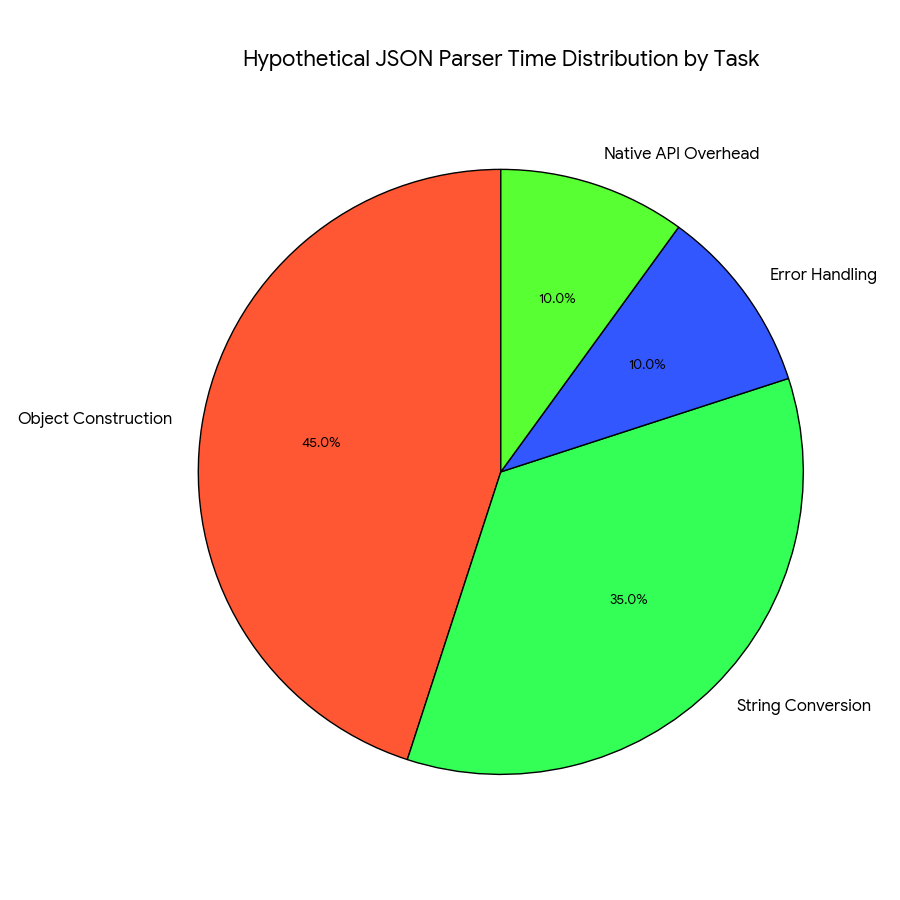
Content for JSON Parser Time Distribution Pie Chart
This pie chart illustrates a hypothetical scenario of where a JSON parser spends its processing time when reading and converting a JSON string into usable in-memory objects.
| Task | Percentage of Time | Description |
| Object Construction | 45.0% | The largest time sink, involving the allocation of memory and building the internal data structures (like dictionaries, lists, or custom objects) that mirror the JSON structure. |
| String Conversion | 35.0% | The time spent reading raw characters from the JSON string and converting them into native programming language strings and numbers. |
| Error Handling | 10.0% | Time dedicated to checking for malformed JSON syntax, ensuring data types are correct, and managing exceptions. |
| Native API Overhead | 10.0% | The time spent communicating with the operating system and the underlying programming language’s C/C++ API (common in highly optimized parsers). |
Key Insight: Focus Areas for Optimization
The chart highlights that 80% of a parser’s time is dedicated to Object Construction 45 and String Conversion 35. This confirms that the “best” JSON parsers (those designed for speed) achieve their performance gains by using highly optimized, low-level routines written in C/C++ to accelerate these two core tasks.
learn for more knowledge
MyKeyword rank ->Best Strategies to Rank on Google’s First Page in 2025 (Complete SEO Guide) – keyword rank checker
Json web token ->What Is JWT Token? (JSON Web Token Explained for Beginners) – json web token
Json Compare ->JSON Comparator, Online JSON Diff, JSON Compare Tool – online json comparator
Fake Json ->Testing Software Tools: Best Tools & Software to Create Fake JSON Data for Testing – fake api
Leave a Reply