A BeautifulSoup JSON parser refers to the technique of using the BeautifulSoup parser library in Python to extract or parse JSON-like data from HTML pages. BeautifulSoup itself is designed primarily as an html parser for HTML and XML parsing, not JSON. However, developers strategically use this powerful web scraper to:
- Scrape web pages.
- Locate JSON data hidden inside the HTML content.
- Extract JSON objects from specific elements like
<script>tags. - Convert that data (often a string in JSON format) into usable Python dictionaries.
So, it’s not a built-in BeautifulSoup feature—it’s a clever method of using BeautifulSoup to find JSON data inside a web page’s source. This is a crucial skill in modern web scraping.
Why Beautiful Soup Is Used for JSON Parsing (Web Scraping)
The BeautifulSoup JSON parser method is essential in web scraping when developers need to overcome limitations:
- A website does not provide a public $\text{API}$ for data access.
- The necessary JSON data is embedded directly inside the HTML content.
- The data is found inside
<script>tags as JavaScript objects (which look like JSON). - The data is part of the page source (markup) but not accessible directly.
Example scenario: Many modern websites (especially e-commerce) store product details inside JSON contained within a script tag. Beautiful Soup helps you find and extract this hidden data, making it the perfect initial web scraper for this task.
How the BeautifulSoup JSON Parser Works: Parse HTML and JSON
The process of using BeautifulSoup to extract JSON involves combining its HTML parser capabilities with the built-in Python json module.
Simple Overview of the Parsing Steps:
- Use
requestsorseleniumto fetch the raw HTML (html content) of the page. - Create a BeautifulSoup object to parse html. This object represents the parsed HTML tree.
- Use BeautifulSoup’s methods, such as
findorfind_all(soup findall), to locate the specific<script>tag or other elements that contain the JSON string. - Extract the raw JSON string (the text content) from the tag.
- Use Python’s
json.loads()to perform the final json parse, converting the raw string into a usable Python dictionary. This is the final step in getting the data into a structured JSON file or variable.
🧩 Example JSON Inside HTML
HTML
<script id="data" type="application/ld+json">
  {"name": "Laptop", "price": 499}
</script>
BeautifulSoup can easily find this tag using its attributes (e.g., type="application/ld+json"), and Python’s JSON module can then parse the enclosed JSON format string.
Where BeautifulSoup JSON Parsing Helps
This method of parsing is vital for advanced web scraping applications, turning messy HTML into clean, structured data:
- Scraping product details or specifications for e-commerce sites.
- Collecting news data or article metadata often embedded in JSON format.
- Extracting structured data (markup) like Schema.org.
- Handling sites that rely on JavaScript frameworks to inject JSON into the page.
Final Summary
A BeautifulSoup JSON parser is an advanced web scraping technique where the Beautiful Soup html parser is used to first locate JSON data inside HTML, extract the raw JSON string, and then reliably parse it using Python’s json module. This technique is indispensable for any web scraper needing to access hidden or embedded data within the source markup of a web page.
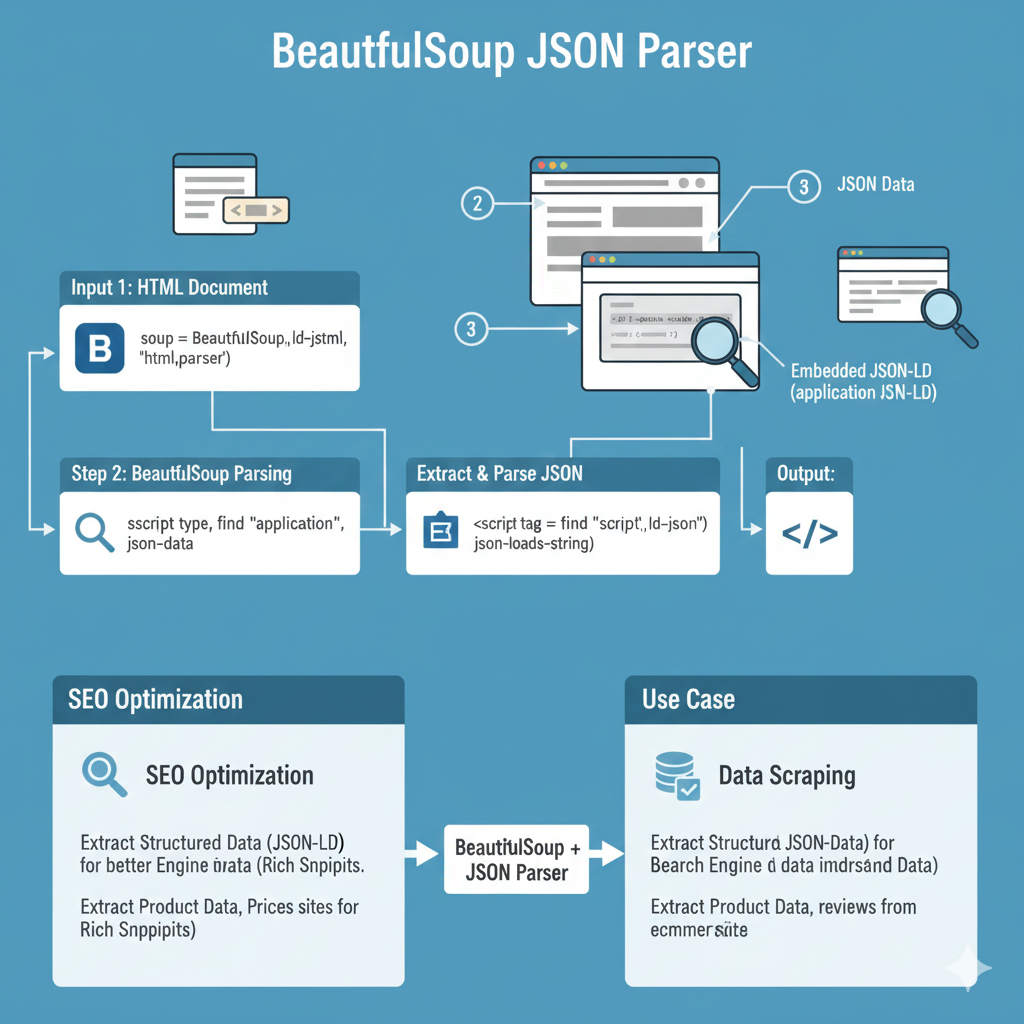
“BeautifulSoup JSON Parser” Infographic
This infographic explains the process of using BeautifulSoup to locate, extract, and parse embedded JSON data, typically JSON-LD (Linked Data), from an HTML document.
1. The Parsing Workflow (Steps 1, 2, 3 & Output)
This section details the flow of data from the input HTML to the final parsed JSON object.
| Step | Title | Action | Details |
| Input 1 | HTML Document | The HTML content is read into BeautifulSoup. | Code example: soup = BeautifulSoup(id-jstml, 'html.parser'). |
| Step 2 | BeautifulSoup Parsing | Use BeautifulSoup to find the specific script tag containing the JSON data. | Action: script type, find "application", json-data. |
| Step 3 | Extract & Parse JSON | Extract the raw string content and load it as a JSON object. | Action: <script tag = find "script", ld-json"> (json-loads-string). |
| Output | JSON Data | The result is the clean, structured data ready for use. | This is often Embedded JSON-LD (application/json-LD). |
2. Use Cases and Benefits
This section shows the practical application of the combined BeautifulSoup + JSON Parser.
SEO Optimization
- Extract Structured Data (JSON-LD): Used for better Engine data (Rich Snippets).
- Extract Product Data: Retrieves product data and prices for Rich Snippets.
Data Scraping
- Extract Structured JSON-Data: Used for Search Engine data understanding.
- Extract Product Data: Gathers product data, reviews from e-commerce sites.
learn for more knowledge
mykeywordrank->Google Search Engine Optimization (SEO)-The Key to Higher Rankings – keyword rank checker
Json web token ->What Is JWT? (JSON Web Token Explained) – json web token
Json Compare ->Online JSON Comparator, JSON Compare tool – online json comparator
Fake Json ->Fake API: Why Fake JSON APIs Are Useful for Developers – fake api
Leave a Reply